


On March 5, 2026, PFU Corporation announced a major update (version 2.0.0) of the HHKB Professional keymap modification tool.
Let’s see what updates have been made.
Please check the official website for the upgrade procedure.
Target; HHKB Hybrid Type-S /Hybrid /Classic Type-S
Click here for a list of coupon codes ▷▷▷


View full list of articles ▷▷▷
Find a keyboard layout you like.
About the update
The features added in this update are as follows
| Functions and Items | Conventional (Ver. 1.x) | New version (Ver. 2.0.0) |
|---|---|---|
| Shortcut setting | Single key assignment only | Simultaneous pressing of multiple keys (executed with one key) is possible |
| modifier key single assignment | Not available (or limited) | Supports modifier key assignment only (with (M) key) |
| Sleep time setting | Fixed (cannot be changed) | Adjustable from 10 to 60 minutes (HYBRID only) |
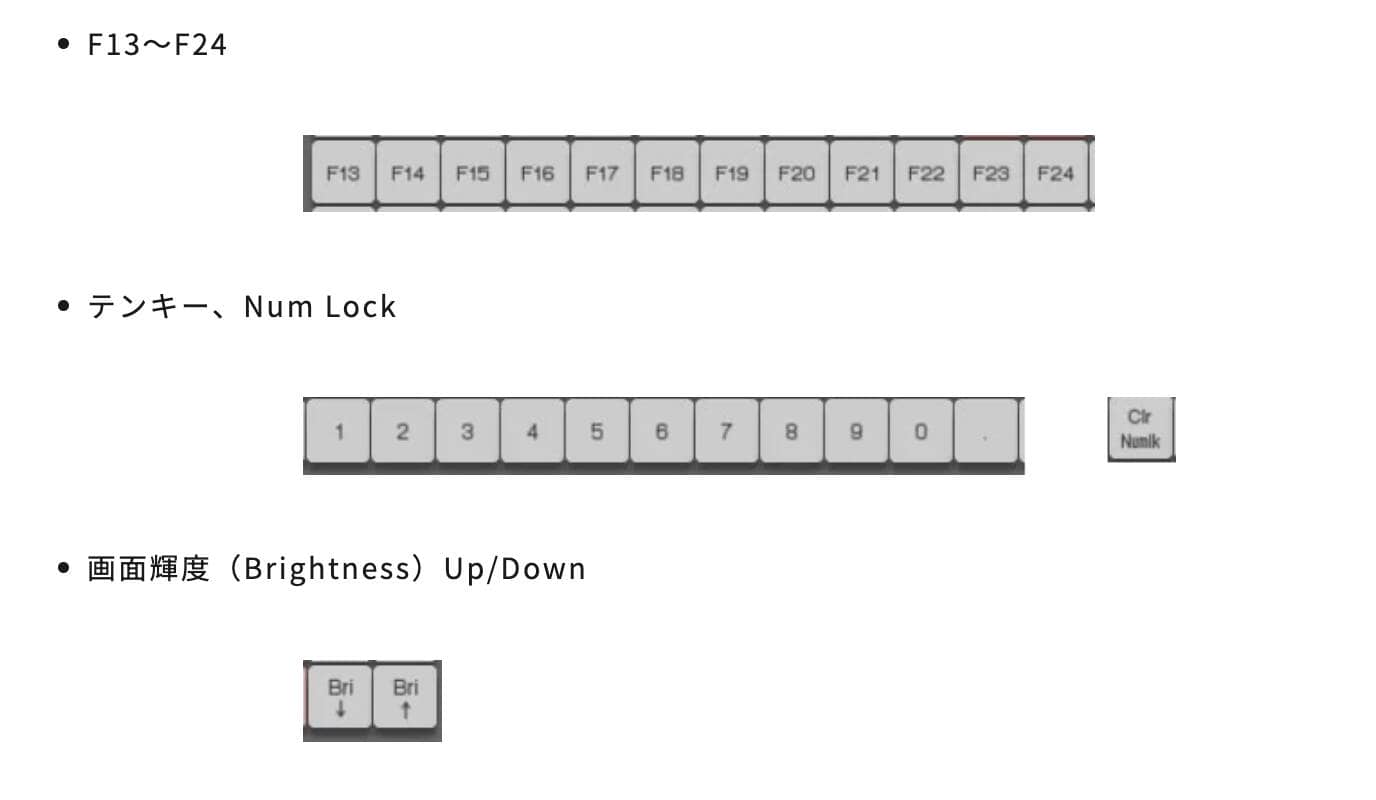
| Configurable key range | Standard keys only | F13-F24, numeric keypad, brightness adjustment, etc. added |
| Layer Switching | Switching operation is required | Visually switchable with dedicated “Layer Tab”. |
| profile compatibility | Independent for each OS | Import/export between Windows/Mac |
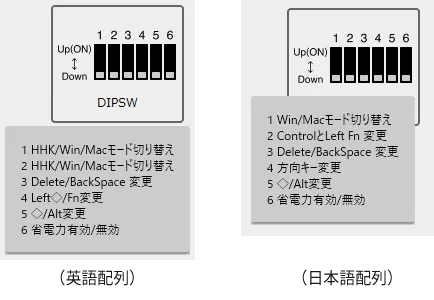
| Friendly UI design | none in particular | Tooltip display on DIP switches and configuration keys |
| dark mode | Mac version only | Windows version also supported (linked to OS settings) |
| Update Confirmation Function | manual confirmation | Automatic check for the latest version at startup |
| MOD-TAP function | uninstalled | Not yet implemented (not included in this update) |
Enables “1-key shortcut”.
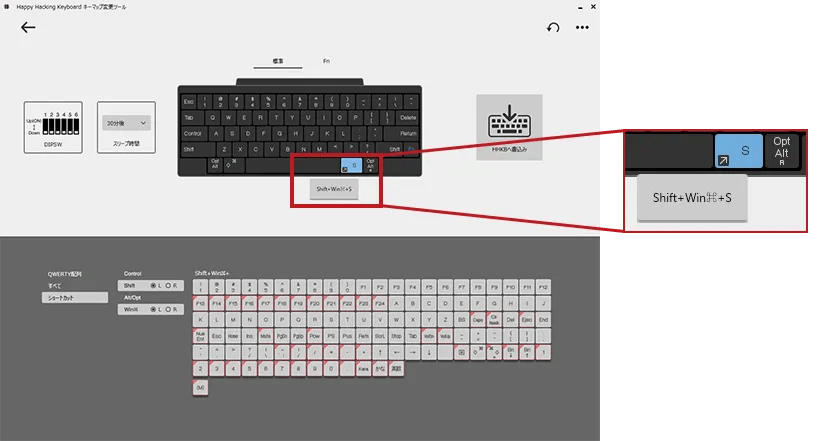
With this update, multiple simultaneous key presses (shortcuts) can now be assigned to a single key.
Modifier keys such as Control, Shift, Alt, and Win/Cmd can be combined with any key, and screenshot operations such as “Win + Shift + S,” for example, can be completed with a single button press.
In addition, only modifier keys can be assigned to specific keys.
 Kawamura
If you are a Mac user, you can also do a range screenshot with ⌘+Shift+4.
Sleep time can be set.
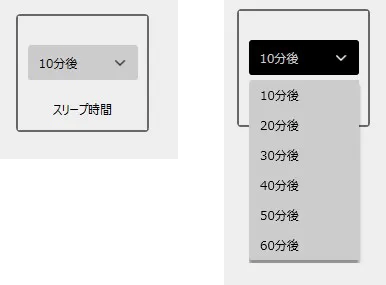
The time until the HYBRID series automatically enters sleep mode when connected via Bluetooth can now be adjusted in 10-minute increments (10 to 60 minutes).
For those who have been feeling that the sleep time is too fast (or too slow), this is an itchy improvement!
Improved UX and expanded configuration keys
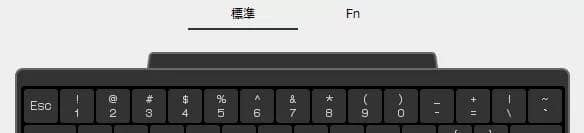


The usability of the tool itself has also been greatly improved.
- Layer tabs added: It is now easier to switch between “Standard” and “Fn” layers on the virtual keyboard with tabs.
- Tooltip display: Mouse-over DIP switches and configured shortcuts to see details.
- Additional configurable keys: F13 to F24, numeric keypad, screen brightness adjustment keys, etc. are now configurable.
- Cross-OS compatibility: Configuration data created on Windows can now be imported to a Mac (and vice versa), making it even easier to manage in a multi-device environment.
Implementation of MOD-TAP will not be implemented.
In this update, the implementation of “MOD-TAP” (a setting that allows a key to function as a specific character when pressed briefly and as a modifier key when pressed long), which was highly anticipated by the community, was unfortunately not implemented.
KawamuraWe talked about this at the HHKB meetup, but it seems to be in the works, so we will wait patiently.
After all, for English alignment users, many people would like to use the ⌘ keys on either side of the space bar as ⌘ with a long press and “alphanumeric” and “kana” with a short press.
Today’s custom keyboards have a “keymap modification function” as a standard feature, which is becoming more and more diverse.
Keymap modification software used on commercial keyboards
| software | platform | Mod-Tap compatibility |
|---|---|---|
| VIA | WEB Apps | possible |
| Vial | WEB Apps | possible |
| ZMK Studio | WEB Apps | possible |
| Keychron Lancher | WEB Apps | possible |
| NuPhy IO 2.0 | WEB Apps | possible |
| Lofree Control HUB | WEB Apps | not allowed |
| Remap. | WEB Apps | possible |
| Happy Hacking Keyboard Keymap Modification Tool | local application | not allowed |
As for the current state of the keyboard market these days, in addition to differentiation in the hardware portion, differentiation in the software portion is intensifying.
This is especially true in the gaming keyboard genre, where fine-tuning of magnetic keyboards is now possible, and the editorial staff expects further software development in the future.
summary
This is to inform you that the HHKB’s keymap modification tool has been updated.
As for HHKB, it will celebrate its 30th anniversary in December 2026.
In October 2025, HHKB will become an independent HHKB Business Department, and in light of its 30th anniversary, HHKB is expected to have a “highlight project” regarding 2026.
I have high expectations for future updates.


- First written on: March 6, 2026
- Last update: March 6, 2026
- Method of coverage: Interviews with the person in charge at the manufacturer’s official release and HHKB user meetups
- See and cited from: https://pc.watch.impress.co.jp/docs/column/miura/2059909.htmlhttps://happyhackingkb.com/jp/news/2026/news20260305.html
- Conflicts of Interest: Product Offering: None Monetization Link in this paper: Yes
Greenkeys operates solely on performance-based advertising and does not use Google ads because they reduce usability.
Please support us through Buy Me a Coffee if you enjoyed reading the article so that we can continue to operate the media.