


November is a bumper month for new trackball releases.
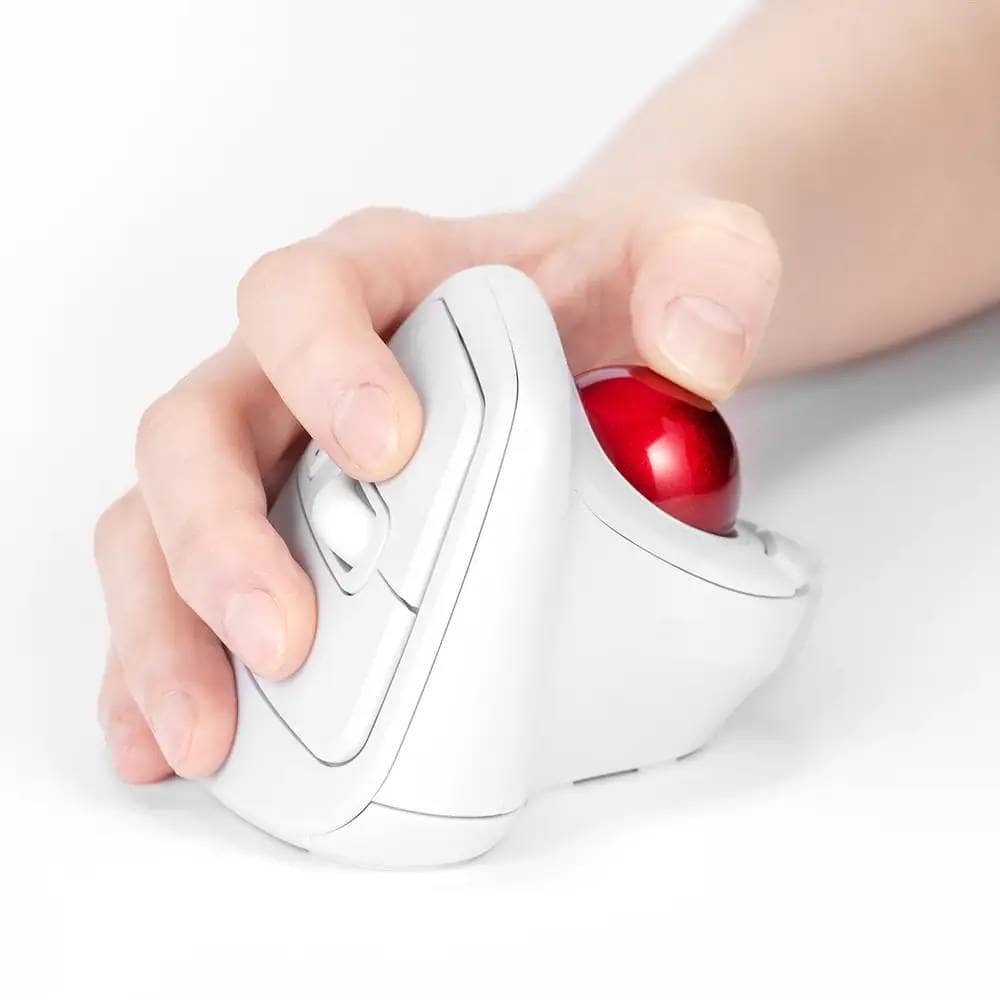
On November 28, 2025, Nakabayashi Corporation announced the Wireless Ergo-Quiet 5-button Optical Trackball (MUS-TRKF248 ), a thumb-operated trackball that purports to reduce wrist twisting.
📰リリース📰
— ナカバヤシ株式会社 (@ncl_jp) November 28, 2025
本日リリースを行いました🎉
手首のねじれを軽減する「無線エルゴ静音5ボタン光学式トラックボール」を新発売
詳細は下記URLから👀https://t.co/z3zHxPJaTe#ナカバヤシ #トラックボール pic.twitter.com/zExXkOPovI
The product will be available at electronics retailers nationwide starting in late November 2025.
Reference: No.1 in market share for press releases and news release distribution
本体を約58°傾けたエルゴノミクスデザインを採用し、一般的なマウスに比べて手首の不自然なねじれを抑え、長時間作業時の負担を軽減することを狙ったモデルとなっている様子。
それではナカバヤシ「無線エルゴ静音5ボタン光学式トラックボール(MUS-TRKF248)」についての概要を見ていきましょう。

Main features – ergo shape with approx. 58° tilt + silent buttons
ナカバヤシ「無線エルゴ静音5ボタン光学式トラックボール」の主なポイントは次のとおりです。
- Ergonomic design with an approximately 58° angle
The shape of the body is tilted to a more vertical position, allowing the user to hold the wrist at a “near straight angle”. The design is intended to allow users to adopt a more natural posture even when switching from a normal mouse grip. - Small trackball with thumb operation
The configuration is like a trackball combined with a standard ergo mouse, and cursor operation is done with the thumb. It seems to work well with users who want to save space and reduce arm movement. - 静音スイッチ採用(左右ボタン)
左右クリックにはカチカチ音の少ない静音スイッチを採用。ボール操作自体もほぼ無音で、在宅勤務や図書館のような静かな環境でも使いやすい仕様です。 - 戻る/進むボタンをボール下に配置
戻る・進むボタンはボールのすぐ下に配置されており、握り直さずにブラウザ操作が可能。
Windows/macOSでは、専用ソフト「Digio2 Mouse Setting」を使って、デスクトップ表示や「元に戻す」など別機能を割り当てることもできます。 - ポインター速度 3段階切り替え
本体のSPEEDボタンで、800/1200/1600dpiの3段階に切り替え可能。トラックボールに慣れていないうちはゆっくり、ウルトラワイドモニターでは速め、といった使い分けがしやすくなっています。
1番の注目ポイントは、58度傾斜させたことによるエルゴノミクスデザインでしょう。
これにより「手首をリラックスしたまま」操作できるとしています。

また、最近のトラックボールらしく、ボタンの役割をソフトウェア側で変更できるのも嬉しいポイント。

クリックボタンは静音ボタンを採用しオフィスユースにも配慮、300万回のクリックテストをクリアしている様子。

Specifications and Pricing – AA battery powered, 2.4GHz wireless only
公式に公表されている主なスペックは以下のとおりです。
- Product name: Wireless ergo silent 5-button optical trackball
- Part No.: MUS-TRKF248
- Color: Black (MUS-TRKF248BK) / White (MUS-TRKF248W)
- Estimated price: Manufacturer’s suggested retail price 8,980 yen (9,878 yen including tax)
- Size and weight: W94 × D111 × H73mm / approx. 124g (excluding batteries and receiver)
- Connection method: 2.4GHz wireless (dedicated USB receiver/USB-A)
- Supported OS: Windows 11 / 10, macOS 10.15 or later, ChromeOS
- Sensor: Optical (RedLED), switchable 800/1200/1600 dpi
- Number of buttons: 5 buttons (left/right + wheel + back/forward)
*Wheel buttons are non-silent - Power source: 1 x AA alkaline battery
- Continuous operating time: approx. 244 hours
- Approximate battery replacement time: approx. 505 days
- Release date: Scheduled to be available at electronics retailers nationwide from late November 2025
It is also unique in that it is not multi-connected or Bluetooth-enabled, but rather is configured as a “single 2.4GHz wireless device”.
まとめ|bitraとどっちが大きい?
以上、ナカバヤシの新作エルゴノミクストラックボールマウスについて紹介してきました。
今年は本当にトラックボールの新作が多いですね。
最近のリリースで比較対象となるのは、エレコムのbitraでしょう。
親指操作モデルのbitraと比べると、MUS-TRKF248はかなり“据え置き寄り”のサイズ感です。
bitra(親指操作タイプ)は本体サイズが約74×90×41mm/約77gと、専用ポーチに入れて持ち歩けるモバイル特化の小型トラックボール。
一方でMUS-TRKF248は約94×111×73mm/約124gと、幅・奥行き・高さのすべてが20〜30mmほど大きく、重量も40g以上重くなっています。
そのぶん本体を約58°まで立ち上げたエルゴ形状と相まって、「手のひらと手首をしっかり載せて使うエルゴ親指ボール」というポジション。
「ノートPCと一緒に持ち歩きたいならbitra、デスクに置きっぱなしで手首の負担を減らしたいならMUS-TRKF248」といった具合に、同じ親指トラックボールでも役割がきれいに分かれています。
| モデル | 幅(W) | 奥行き(D) | 高さ(H) | 重量 |
|---|---|---|---|---|
| ナカバヤシ MUS-TRKF248 | 約94mm | 約111mm | 約73mm | 約124g(電池・レシーバー除く) |
| エレコム bitra 親指操作(M-MT1MRSシリーズ) | 約74mm | 約90mm | 約41mm | 約77g(電池含まず) |
手首を捻らない体験をしたい方はぜひ購入を検討してみてくださいね。
- 初版執筆日:2025/11/30
- 最終更新日:2025/11/30
- 取材方法:メーカー公式リリース
- 参照・画像引用元:https://prtimes.jp/main/html/rd/p/000000202.000098606.html
- 利益相反:商品提供:なし 本稿収益化リンク:あり
Greenkeys operates solely on performance-based advertising and does not use Google ads because they reduce usability.
Please support us through Buy Me a Coffee if you enjoyed reading the article so that we can continue to operate the media.