


Updated November 29, 2026
Crowdfunding for the Altar II has launched on Kickstarter.
- Campaign ends: December 10, 2026
- Campaign price: $299
- Estimated shipping: Around July 2027
- Supported layouts: US ANSI and UK ISO
In addition to the original announcement, the company has also announced a web-based configuration tool for Windows and Linux, as well as support for changing the keymap with ZMK Studio.
See the official Kickstarter project page and FAQ for details.
https://www.kickstarter.com/projects/electronicamaterials/altar-ii
This looks kind of interesting, but it’s worth noting that it isn’t a “mechanical keyboard” in the way most people imagine one.
On August 12, 2026, London-based Electronic Materials Office announced the low-profile keyboard “Altar II” in Japan through a press release on PR TIMES.
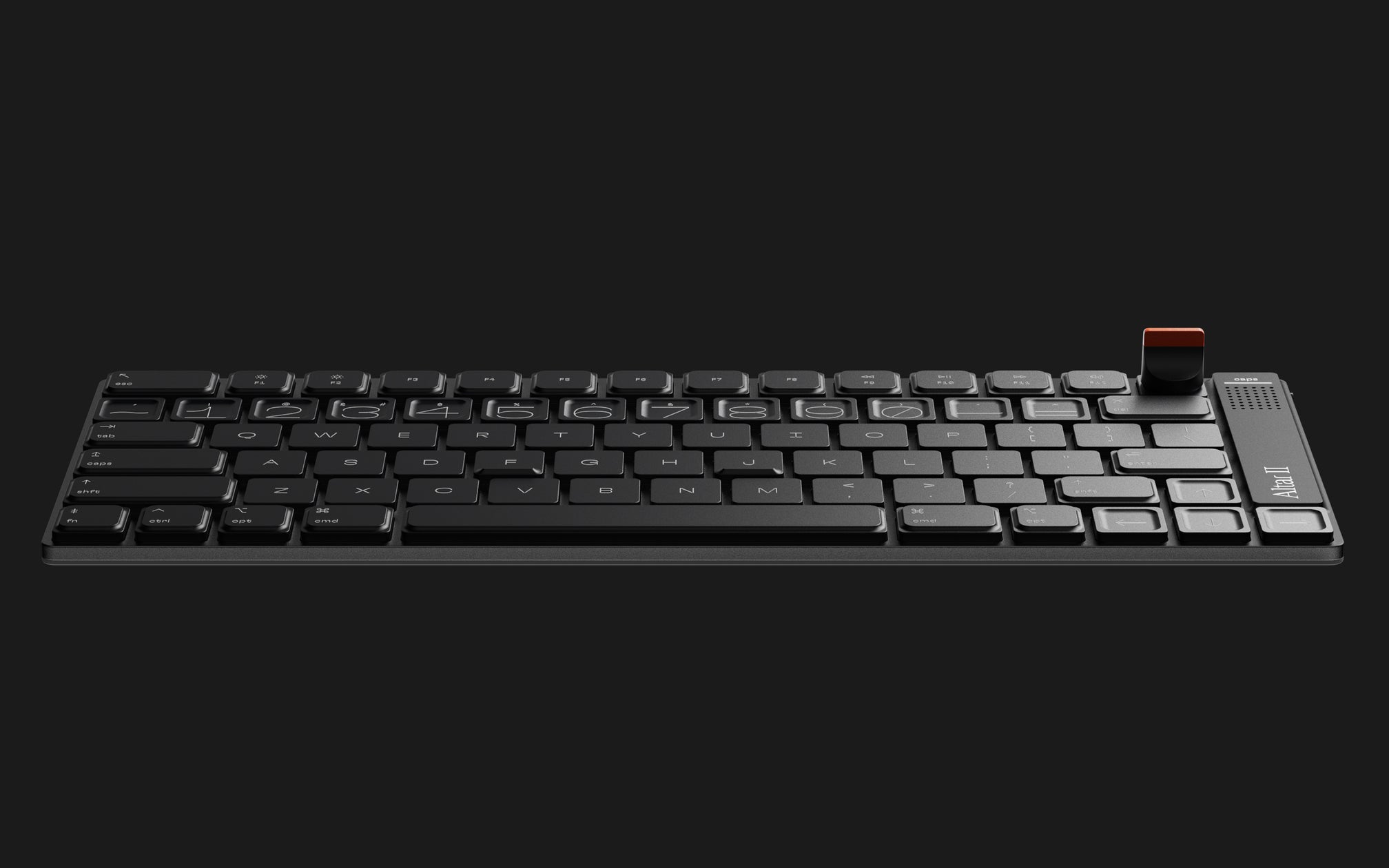
The keyboard is just 4.75 mm thick.
It features a 75% layout in an aluminum case, with 1.8 mm-travel switches, a detachable dial, haptic feedback, and a speaker.
Crowdfunding on Kickstarter begins on November 10, 2026 with rewards scheduled to ship in early summer 2027.
In other words, the product is effectively a year away from arriving.
The official website is currently taking “reservations” that provide access to Kickstarter backer pricing, with a $1.00 deposit required.
View Altar II on the official website

Altar II Pricing and Availability

| Item | Details |
|---|---|
| Product name | Altar II |
| Kickstarter launch date | November 10, 2026 |
| Backer-only price | $249 |
| Price for the first 48 hours | $279 |
| Campaign price | $299 |
| Planned retail price | $349 |
| Estimated shipping | Early summer 2027 |
| Deposit | $1 / fully refundable |
By paying a $1 deposit on the official website, you can secure the right to purchase at the $249 backer-only price.
Reservations are scheduled to close when the Kickstarter campaign begins.
 Kawamura
This kind of thing is probably still quite unfamiliar in Japan.
This payment method is called a deposit model: by paying a deposit, you buy the “right” to purchase at an exclusive price.
You are free to exercise that right or not.
There’s no problem if you change your mind and decide not to buy.
A 75% Keyboard Just 4.75 mm Thick

The Altar II is a 75% layout keyboard with a function row and dedicated arrow keys.
The keyboard measures 299 mm wide, 116.5 mm deep, and 4.75 mm thick.
Its thinness is promoted quite aggressively, and the website design emphasizes how thick competing keyboards are.


 Kawamura
It’s a little concerning to see scissor switches, low-profile mechanical switches, and Cherry MX mechanical switches presented on the same footing.
| Item | Specifications |
|---|---|
| Layout | 75% |
| Dimensions | 299 × 116.5 × 4.75 mm |
| Key travel | 1.8 mm |
| Actuation force | 40 gf |
| Connectivity | Bluetooth 5.0 LE / USB Type-C |
| Bluetooth device connections | 2 devices |
| Battery life | Up to 30 days |
| Firmware | ZMK / Zephyr RTOS |
| Compatible operating systems | macOS 12 or later / Windows 10 or later |
| Color | Black |
The body features a unibody construction milled from 6061 aluminum.
It also supports fast charging, providing up to 2 days of use from a 2-minute charge.
The estimated battery life of up to 30 days is based on 8 hours of use per day, with the backlight on for 30 minutes a day.
The firmware is based on ZMK, which has become a common choice in recent years. Keymap changes can be made using Sanctuary™, a fully native macOS companion app developed in Swift.

The only physical layout option is ANSI (English layout). The company says it was designed from the ground up as “the definitive Mac keyboard.”
It can also be used with Windows and Linux, and the Command, Option, Control, and Function keys appear to be in the expected positions.
Keycap profiles vary by row

On closer inspection, the number row and arrow keys have spherical tops with concave centers, while the function row and modifier keys use keycaps with narrower top surfaces.
The letter keys, on the other hand, have a flat profile.


The key layout is quite unusual

The key layout seems quite unusual compared with that of a typical keyboard.
Its width is 15.75u, rather than the 16u size used by typical 75% keyboards.
Looking at the bottom row, the Command keys flanking the spacebar are asymmetrical: the left is 1.25u and the right is 1.5u. The spacebar appears to be 6u.
The Enter key is also smaller than usual, and the Z row is offset by only 0.25u from the A row.
The Esc key appears to be 1.75u, likely following the MacBook layout.
The positions of the spacebar, the Command keys on either side, and the Z row follow the original layout, but the Z-row offset differs from the norm—a choice that may divide opinion.

The concept is similar to the Flow2 for Mac.

Not a standard MX-compatible switch
Electronic Materials Office describes the Altar II as a “fully mechanical keyboard.”
However, the official specifications list “dual steel-arm scissor switches” with retaining springs.

Rather than using a slimmed-down version of a standard MX-compatible mechanical switch, it achieves 1.8 mm of key travel with a horizontally positioned, preloaded tension spring.
So this is not a product to choose if you expect the same switch construction as a conventional mechanical keyboard or the ability to replace its switches.
Since hot-swap support has not been announced either, anyone considering a purchase would be better off viewing it as a low-profile keyboard with a proprietary design.
Magnetically Detachable “M-Dial”

The top-right corner of the keyboard features the “M-Dial,” a rotary dial that attaches and detaches magnetically.
By default, it supports the following functions:
- Rotate: Adjust volume
- Press once: Play/pause
- Press twice: Skip to the next track
- Press three times: Skip to the previous track
- Press and hold: Launch Siri
Two types are included: standard and low-profile.
Drawings and 3D files for the M-Dial are also planned for release, allowing users to 3D-print dials in custom shapes.
Built-In Haptic Motor and Speaker
Altar II supports haptic feedback using a high-precision linear resonant actuator.
It recreates the click sensation of turning the dial through haptic feedback, and also uses vibrations to signal connection changes, charging, and macOS notifications.
It also has a built-in speaker that plays sounds such as startup tones, charging sounds, and connection confirmations.
The Mac companion app “Sanctuary” lets you change the following settings:

- Key mapping
- M-Dial behavior
- Haptic feedback
- Backlight
- Sound volume
- App-specific shortcuts
However, Sanctuary requires macOS 26 Tahoe or later.
It can also be used as a standard keyboard with Windows or Linux, but settings cannot be configured through the companion app.
In practice, it would be fair to consider it a keyboard for Mac users.
Red LED Backlight

The backlight uses “NiteLite,” which employs long-wavelength red LEDs.
An ambient light sensor turns it on only when the surroundings are dark and automatically adjusts its brightness.
Rather than a conventional RGB backlight, it is designed with visibility in dark environments and power consumption in mind.
The keycaps use “REGEN Polymer,” a proprietary material containing at least 50% recycled plastic.
The packaging is also plastic-free, made from paper and biodegradable sugarcane pulp.
In Summary: An Unconventional Keyboard That Catches the Eye
That’s our look at Altar II.
Altar II’s appeal goes beyond its thinness alone.
Fitting a battery, haptic motor, speaker, and detachable dial into a 4.75 mm-thick body makes for a highly distinctive design, and it gives the impression that development must have taken a very long time.
It is also interesting that it uses ZMK and can store settings on the keyboard itself.
At the same time, there are plenty of aspects that raise questions.
First, there is the phrase “fully mechanical.”
If you take “fully mechanical” to mean a conventional low-profile mechanical keyboard, the actual structure differs from that expectation.
The official specifications list steel-arm scissor switches with 1.8 mm of key travel.
How pronounced the typing feel is remains something we’ll have to check on an actual unit.
The physical layout also warrants attention.
Because the Z row is shifted farther left than usual, people who regularly type on English-layout keyboards may find it subtly unfamiliar.
Japanese-layout keyboards have one more key in the Z row than English-layout keyboards, so in my experience, layouts with the Z row shifted farther left than usual are relatively common.

By contrast, keyboards with a shifted Z row are probably much less common among English-layout keyboards.
Because this can affect “muscle memory,” English-layout users may be more sensitive to it than Japanese-layout users, so it is worth considering before buying.
- First published: August 13, 2026
- Last updated: November 29, 2026
- Research method: Manufacturer’s official website and press release
- Sources:
- Conflict of interest: No product provided; no monetized links in this article


Google検索の「優先ソース」にGreenkeysを追加します
Add Greenkeys as a Preferred Source on Google
