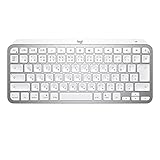
Easy-switch key to connect up to three devices and easily switch between them
10-meter wireless coverage 5Wireless coverage may vary depending on the operating environment and PC setup.
Backlight turned on by proximity sensor that detects hands
Ambient light sensor to adjust backlight brightness
USB-C rechargeable. Up to 10 days of use after full charge or 5 months with backlight off 6Battery life may vary depending on usage conditions.
ON/OFF power switch
Caps Lock and battery indicator light
Compatible with Logitech Flow-enabled mice
Note: FILEVAULT
FileVault is an encryption system available on some Mac computers. Enabling it may prevent Bluetooth devices from connecting to your computer if you are not already logged in; it is recommended that you purchase a compatible Logi Bolt USB receiver if you wish to enable FileVault.
Warranty Information
2-year free warranty
model number
KX700MPG
system requirement
Internet connection (for software download)
Logi Options+ software on macOS/Windows
Bluetooth Low Energy enabled devices that support keyboards
Bluetooth
Required: Bluetooth Low Energy
macOS 10.15 or later
iOS 13.4 or later 7 device basic functionality works without software on iOS and iPadOS
iPadOS 14 or later 8 Basic device functionality works without software on iOS and iPadOS
compatibility
Compatible with Logi Bolt USB receiver (sold separately)
Logi Bolt wireless products cannot be paired with other Logitech USB receivers
Ryosuke Kawamura is the Editor-in-Chief of Greenkeys and the founder of GreenEchoes Studio.
He covers mechanical keyboards, custom keyboards, and input devices through reviews, interviews, hands-on testing, photography, and editorial work. He has reviewed more than 100 products and regularly reports on JIS-layout compatibility and trends in the Japanese keyboard market.
He also founded the Japan Layout Alliance (JLA), an industry collaboration initiative aimed at improving compatibility for Japanese-layout keyboards.
Greenkeys values editorial independence and transparency. Product samples, advertising relationships, and affiliate links are disclosed within each article.