


On March 14, 2023, AKEEYO, the company behind the Niz keyboard brand, began crowdfunding for the NiZ X99 on the crowdfunding website Makuake.

At the time of submission, the goal amount has already been reached, which shows the popularity of the program.
Image and information reference: https: //www.makuake.com/project/niz_99

Features of AKEEYO NiZ
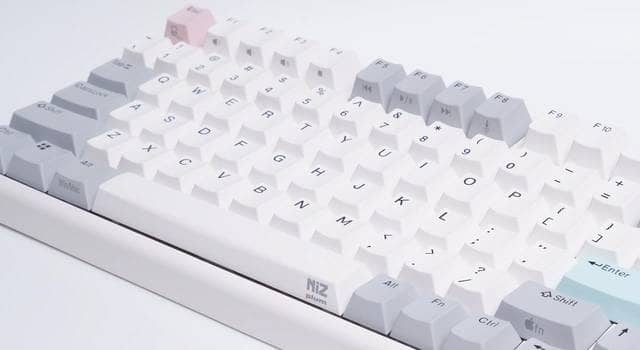
The NiZ X99 is a mechanical keyboard with a 96% layout.
Unlike ordinary keyswitches, this model uses a capacitance non-contact system, which gives the impression that many people are attracted to the unique keystroke feel of the keyboard.
 Kawamura
Many of you may have become fans with HHKB and REALFORCE.
I love it too.
The pressing pressure is 35g, lighter than that of the HHKB, enabling lighter and smoother keystrokes without resistance.
The CHERRY MX compatible axis is used, and since it is not a “nearly incompatible Topre axis” like the HHKB, the keycaps are highly versatile and the keymap can be changed using proprietary software, allowing for flexible customization.
Disadvantages of AKEEYO NiZ
As for X99, we have not been able to check the actual device, so we will introduce the disadvantages we felt using Niz Plum66.
- Low molding accuracy and burrs on keycaps
- The tilt mechanism of the stand locks so strongly that the plastic is likely to break.
- Keymap change software is supported only on Windows
- Switching to Mac layout does not allow keymap changes
First, let me preface this by saying that NiZ is a great keyboard and I love it.
As a fan, I dare to mention this as a way of saying that it would be even better if it were improved.
The most problematic of the above disadvantages is that if a Mac user wants to customize the keymap, it is impossible without having Windows.
In addition, keymap changes can only be made in Windows mode, so if you want to use it with a Mac, or only in Mac mode, you cannot change the keymap.
In the case of Mac, the correspondence is Win→Command, Alt→Optiopn. Therefore, to use it comfortably on Mac, it is necessary to set it for Mac in Windows mode based on these correspondences.
Summary|Niz X99 is recommended for Windows users
The above is an introduction to the Niz X99.
If you purchase through crowdfunding, you can get up to 31% off the estimated selling price of 28,500 yen (including tax) at 19,665 yen (including tax).
The capacitance non-contact method is used in ATMs at 7-Eleven convenience stores, so if you want to check the keystroke feel, go to a convenience store.
*Not all ATMs use this technology.
Please purchase from McAke.
Fingers never get tired! Capacitance-free keyboard for endless typing


Google検索の「優先ソース」にGreenkeysを追加します
Add Greenkeys as a Preferred Source on Google

