


A trackball split keyboard combines a trackball with a keyboard split into left and right halves, letting you handle everything from typing to cursor control without moving away from the keyboard.
Well-known models include the Keyball series, Keychron Orca echo, and conductor.
The options include models available as complete products, kits that require DIY assembly, and models expected to go on sale in the future. They also differ in how they are purchased, their layouts, and the position of the trackball.
At the same time, the design philosophy behind trackball split keyboards means they differ from conventional keyboards in many ways, and switching to one can involve a significant learning curve.
In particular, their emphasis on keeping your hands at the home position means they often have far fewer keys than a standard layout and rely on layers for input. Many also take time to understand and learn.
This article compares trackball split keyboards, outlining their differences and how to choose between them.
- Trackball split keyboards suit people who want to reduce how often they move their hands away from the keyboard
- If you’re choosing one for the first time, consider not just the trackball position but also the number of keys, layout, and difficulty of using layers
- Keyball models are popular among DIY keyboard enthusiasts, but assembly and configuration may require some technical knowledge
- Mass-produced models like the Orca echo are easier to get started with, but you’ll need to get used to the compact layout
- Finished, mass-produced trackball split keyboards are likely to attract more attention in the future

What Is a Trackball Split Keyboard?

A trackball split keyboard is a keyboard that combines a trackball with a keyboard split into left and right halves.
The split design lets you position your hands naturally to match your shoulder width, while the built-in trackball lets you type and control the cursor without switching to a mouse. This is the defining feature of these keyboards.
You may find a trackball split keyboard especially useful when your work frequently switches between typing and mouse control.
On the other hand, trackball split keyboards involve more input methods than conventional keyboards, and some models require you to get used to layers or an unusual layout.
Recommended Trackball Split Keyboards
Here, we take a look at popular trackball split keyboard models, as well as some that are worth watching.
Availability and specifications may change, so be sure to check the official information or product listing before buying.
| Model | Category | Features | Best for |
|---|---|---|---|
| Keyball series | DIY keyboard Soldering required | A leading example of a thumb-operated trackball split keyboard Thumb-operated model 30%, 40%, and 50% layouts Column-staggered layout Wired connection | People who want reliable wired operation People who can source their own parts, including keycaps and switches |
| Keychron Orca echo | Finished keyboard | Mass-produced trackball split keyboard Thumb-operated model 40% layout Column-staggered layout Wireless connection | For those who want a prebuilt keyboard |
| conductor | Prebuilt keyboard | Trackball split keyboard expected to reach the market Thumb-operated model 30% layout Ortholinear layout Wireless connection | For those who want a prebuilt keyboard For those who prefer a more compact model |
| Vortex M50 | Prebuilt keyboard | Trackball split keyboard expected to reach the market Index-finger-operated model 50% layout Column-staggered layout Wireless connection | For those who want a prebuilt keyboard For those who prefer an index-finger-operated model |
| torabo-tsuki | Custom keyboard Case printing required | Thumb-operated model 30%, 40%, and 50% layouts Column-staggered layout Ortholinear Wireless connection | For those who can source their own keycaps and switches |
| moNa2 | Custom keyboard Soldering required | Thumb-operated model 30% layout Column-staggered layout Wireless connection | For those who can solder For those who can source their own keycaps and switches |
Keyball Series

| Product type | Custom keyboard |
|---|---|
| Pointing method | Thumb-operated trackball |
| Layout | 30%, 40%, and 50% |
| Key layout | Column-staggered layout |
| Connection | Wired connection |
| Assembly | Soldering required |
| Profile | Standard profile MX-compatible |
A keyboard that helped establish the split trackball keyboard category.
The seller is Shirogane Lab, based in Gifu Prefecture.
Three models are available, with 39 keys in the 30% layout, 44 in the 40% layout, and 61 in the 50% layout. An assembly service is also available, starting at ¥8,800 (tax included).
Prices range from ¥23,800 to ¥25,800 (tax included).

Another appealing feature is the dedicated keymap editor, Keyball Link, designed specifically for Keyball.

Keychron Orca echo

| Product type | Prebuilt keyboard |
|---|---|
| Pointing method | Thumb-operated trackball |
| Layout | 40% |
| Key layout | Column-staggered layout |
| Connectivity | Wireless connectivity |
| Features | A trackball-equipped split keyboard sold as a mass-produced product |
| Switch profile | Low-profile Gateron LowProfile 3.0 (expected) |
A keyboard conceived by Gizmodo Japan and manufactured by Keychron.
It is the first “mass-produced” trackball-equipped split keyboard.
The trackball’s inward position may divide opinion, but this is arguably the most readily available trackball-equipped split keyboard.
For details on the user experience and what to watch for when switching from a conventional keyboard, see Orca echo Short Review.
conductor

| Product type | Prebuilt keyboard |
|---|---|
| Pointing device | Thumb-operated trackball |
| Layout | 30% |
| Key layout | Ortholinear layout |
| Connectivity | Wireless connectivity |
| Features | A trackball-equipped split keyboard planned for mass production and commercial release |
| Switch profile | Low-profile Kailh Choc V2 |
conductor is a model anticipated to reach the market as a trackball-equipped split keyboard.
At present, some official details, such as the price and release timing of the mass-production version, have not been announced.
This article therefore introduces it as an option to watch.
We plan to add details once official sales information and specifications are announced.

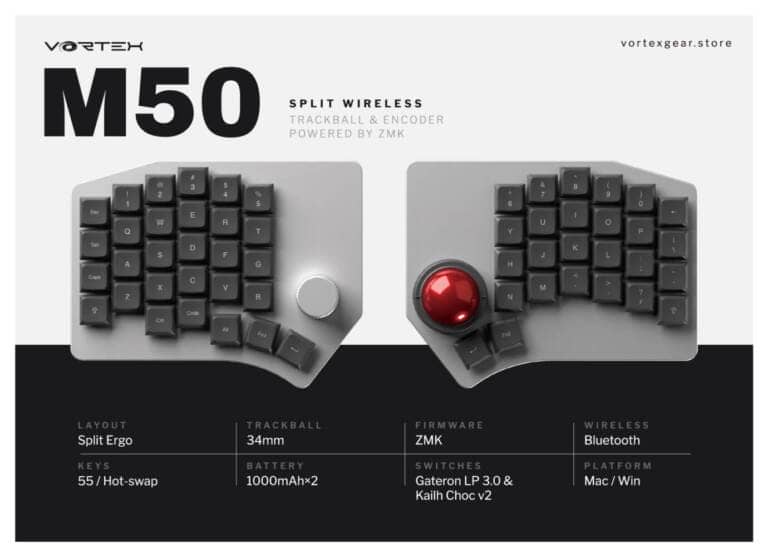
Vortex M50

| Product type | Prebuilt keyboard |
|---|---|
| Pointing device | Index-finger-operated trackball |
| Layout | 50% |
| Key layout | Column-staggered layout |
| Connectivity | Wireless connectivity |
| Features | A split keyboard with an index-finger-operated trackball near the center |
| Switch profile | Low-profile Gateron LowProfile 2.0 Kailh Choc V2 (multi-profile at the time of reporting) |
The M50 is a Vortex keyboard that is expected to reach the market.
Its index-finger-operated trackball and 50% layout, which retains the number keys, are also noteworthy.
Its release date has not yet been determined.
torabo-tsuki

| Product type | DIY keyboard |
|---|---|
| Pointing device | Thumb-operated trackball |
| Layout | 30%, 40%, and 50% |
| Key layout | Column-staggered / ortholinear |
| Connectivity | Wireless connectivity |
| Assembly | The trackball case requires 3D printing LP model v2 model requires no soldering v1 model requires soldering only for the battery case Non-LP model—soldering required |
| Profile | Normal profile (non-LP model) – MX-compatible Low profile (LP model) – Kailh Choc v2 |
A left/right split keyboard with a trackball, sold by Nogikesuya.
One distinctive feature is that it comes in both normal- and low-profile models.
It also offers a wide range of layouts, including 30%, 40%, and 50% models, as well as an ortholinear model.
Some models use a 17 mm key pitch, which limits compatibility with commercially available keycaps. Keep in mind that there are fewer compatible options.
moNa2

| Product type | DIY keyboard |
|---|---|
| Pointing method | Thumb-operated trackball |
| Layout | 30% |
| Key layout | Column-staggered |
| Connectivity | Wireless connectivity |
| Assembly | Soldering required |
| Profile | Kailh Choc v2 |
An ultra-compact keyboard with a 17 mm key pitch and a 30% layout.
It is very popular and can be difficult to get.
Keep in mind that its keycaps are not readily available from commercial sources.
Advantages of Trackball-Equipped Split Keyboards
Trackball-equipped split keyboards offer the following advantages.
- Type and control the cursor while keeping your hands at the home position
- Flexible placement
- A good fit with the split-keyboard philosophy
Type and control the cursor while keeping your hands at the home position
The biggest advantage of a trackball-equipped split keyboard is that it minimizes the amount of hand movement needed for typing and cursor control.
You can position a regular split keyboard to match your shoulder width, but cursor control requires a separate mouse or trackball, which often means taking your right hand off the keyboard.
With a trackball-equipped model, you can control the cursor without moving your hand far from the keyboard, which may help you focus more on typing.
Flexible Placement
With an all-in-one keyboard that has a trackball, the trackball’s position is fixed by the keyboard’s layout, so you have to adjust your finger movements to reach it.
With a split keyboard, by contrast, you can place the half with the trackball wherever it feels most comfortable, which may make it easier to use than an all-in-one keyboard with a trackball.
A good fit for the split-keyboard philosophy
A split keyboard lets you set up your typing environment to suit your body without forcing your hands and arms toward the center.
At the heart of this philosophy is adjusting the keyboard to a more comfortable position for your body, rather than adjusting your body to the keyboard.
Trackball models take this idea a step further by bringing cursor control within reach, along with typing.
Drawbacks and Caveats of Trackball Split Keyboards
Here are some points to keep in mind before getting a trackball split keyboard.
- You need to get used to both the split layout and trackball operation
- Many models assume you’ll use layers
- Trackball placement may or may not suit you
- Few ready-to-use options are available
- They may not completely replace a regular mouse
You need to get used to both the split layout and trackball operation
Compared with a regular keyboard, a trackball split keyboard has many elements to get used to and can come with a high switching cost.
Having the keyboard split into left and right halves will likely require a major change to your typing style.
The biggest drawback is that it takes time to adjust—not only to using the trackball, but also to the very different way you click.
People who already use a split keyboard or trackball may find the transition easier, but if both are new to you, the change can be disorienting.
Many models assume you’ll use layers
Trackball keyboards pair particularly well with split keyboards because both are designed to minimize hand movement during cursor control.
In other words, minimizing hand movement makes small keyboards a particularly good fit. As a result, many trackball split keyboards are designed around the idea that reducing hand movement calls for fewer keys.
Small keyboards have fewer keys than regular keyboards, and omitted keys are assigned to secondary layers.
Because small keyboards are built around the concept of layers, using one often requires learning a different approach from the one used with a regular keyboard.
Trackball placement and size may or may not suit you

On a trackball split keyboard, the trackball’s position has a major impact on ease of use.
It’s not just a matter of whether the trackball is operated with the thumb or index finger: even within each type, people have very different preferences about where the trackball should be positioned.
If it doesn’t suit your hand size or finger movements, it may feel awkward to use.
It is important to carefully consider which finger operates the trackball and where it is positioned on each type.
The ball’s diameter is also important.
A smaller ball interferes less with typing, but can make precise control more demanding.
A larger ball, on the other hand, can be easier to control, but it is more likely to interfere with typing and makes the keyboard larger to carry. These are trade-offs to keep in mind.

Few Ready-to-Use Options Are Available
Trackball split keyboards have a following in the custom keyboard community, but the number of models available to buy as complete products is still quite limited.
With a custom keyboard kit, you may need to solder and flash the firmware, choose all the parts yourself—including keycaps and switches—and make do with limited support.
In recent years, more complete models have become available, including the Keychron Orca echo, conductor, and Vortex M50. However, these keyboards are still far from mainstream, and their limited availability is a drawback.
They May Not Fully Replace a Regular Mouse
A trackball split keyboard is a compelling option for reducing how often you switch to a mouse.
However, for tasks such as image editing, precise drag-and-drop operations, and gaming, a regular mouse is often easier to use.
Rather than trying to replace your mouse entirely from the outset, it is more practical to use the trackball split keyboard for everyday cursor control and keep a mouse handy for precision work.
How They Differ from Regular Trackball Keyboards
| Comparison | Trackball Keyboard | Trackball Split Keyboard |
|---|---|---|
| Main purpose | Saving desk space and combining keyboard and pointer controls | Adjusting posture, reducing hand movement, and creating a home-row-centered workspace |
| Placement flexibility | Depends on the shape of the device | Easy to adjust the position and angle of each half |
| Ease of adoption | Relatively straightforward | May require getting used to split placement and layer controls |
| Who it suits | People who want to save desk space | People who want to tailor their keyboard and pointer controls to their body |
For an overview of how trackball keyboards differ overall, including integrated and separate designs, see What Is a Trackball Keyboard? Differences Between Integrated, Separate, and Split Designs.
Which Models Are Easiest to Recommend to Beginners?
If this is your first trackball split keyboard, consider not only the trackball but also how easy the keyboard is to use.
The following features, in particular, can make a model somewhat challenging for beginners:
- Compact layouts with 40% or fewer keys
- Models that rely heavily on layers
- Models that are your first introduction to a column-staggered layout
- Models that require assembly or firmware configuration
- Models with an unusual trackball position
Of course, once you get used to them, these features can be very practical.
However, for a first keyboard, it is important to choose one you can comfortably keep using rather than the most feature-packed model.
As of this writing, no commercially available split keyboard with a trackball, a row-staggered layout, and a large number of keys exists.
Who Should Consider a Split Keyboard with a Trackball?
A split keyboard with a trackball is not necessary for everyone.
It may be especially well suited to people who:
- Want to reduce how often they move their hands from the keyboard to the mouse
- Want to work mainly from the home row
- Type for long periods
- Are already comfortable with split keyboards
- Want to customize their keymap and layers
- Want to keep their desk’s input devices compact
However, if you are switching from a conventional keyboard for the first time, be aware that there will be more to learn than with a standard split keyboard.
Conclusion
That covers our recommended split keyboards with trackballs, along with their advantages and disadvantages.
Until now, DIY keyboards were the only option in this category. Even for people able to solder and assemble one, individually sold products with limited availability and significant concerns about support were the norm.
Since 2026, the situation has begun to change, with Keychron releasing a mass-produced split keyboard with a trackball, finally making the category more accessible to general users. Other companies are also planning to bring their products to the mass market.
Split keyboards with trackballs are likely to attract even more attention in the future.
Why not try a new kind of input experience for yourself?
- First published: July 11, 2026
- Last updated: July 11, 2026
- Research method: Product websites consulted
- Sources and references: Product websites consulted
- Conflict of interest: No products provided; no monetized links in this article


Google検索の「優先ソース」にGreenkeysを追加します
Add Greenkeys as a Preferred Source on Google

