


We tested a fully working Keychron Orca Echo sample at a hands-on event in Tokyo.
Unlike the earlier mock-up, this unit allowed us to evaluate the 19 mm trackball, typing feel, ABS enclosure, tenting legs, and overall usability. Here is what improved—and what still deserves attention before the final release.
On August 30, 2026, we attended the Keychron Orca echo early hands-on event held on the 6th floor of MediaGene Co., Ltd. as Greenkeys.
Event info: https://www.gizmodo.jp/article/orca-echo-g6-he-ultralight-event-1/
On the day, a fully working sample unit was on display, and it was announced as “your last chance to check the feel, size, and more in person before buying.”
As of writing, Orca echo has already surpassed ¥600 million in funding and topped 23,000 backers—making it a hugely popular product.

With the crowdfunding period extended to September 14, it was a rare opportunity to try it and still be able to buy afterward, and many people turned up.


In this article, we’ll cover the sample unit details, how it actually feels to use, and answers we got from the staff.

Keychron Orca echo: looks and build quality
Let’s go through the points of interest one by one.
ABS resin case: texture and rigidity
The look and feel were very good.
If you’re used to “aluminum cases” like the Cornix LP, you may have worried that a “resin case” would feel cheap.
 Kawamura
That concern was completely put to rest.
The case is made of ABS resin, and it appears to be injection-molded.
The surface has a matte finish and doesn’t have that plasticky, cheap feel.
It has enough thickness to feel solid, and it also seems to be a key factor in achieving the light weight of about 420 g.

The two-stage tenting legs we were worried about also felt sturdy enough, and they don’t seem likely to break under normal use.
About the trackball
At the mock-up display at Tenkey in June, the trackball case shaping was insufficient and the ball could fall out, but it’s clear this has been significantly improved on the sample unit.


The 19 mm trackball used here felt surprisingly heavy for its size.
According to Ando, “If it’s too light it gets twitchy, so we made it a bit heavier to prioritize controllability.”

 Kawamura
That’s exactly right: the ball’s weight has a big impact on cursor behavior.
The lighter it is, the faster it spins, making cursor movement smoother. On the other hand, because it spins too quickly, fine adjustments become harder—there’s a trade-off.
Let’s take a look at the trackball socket.
The trackball socket has retaining “tabs” to prevent it from coming out.
The sensor is mounted on the underside, with four support bearings, and the material is said to be “ceramic.”


 Kawamura
For most people, the thumb cluster on the right side of the trackball will become the right-hand home position.
The raised edge of the trackball case is intentionally placed on the thumb-cluster side, likely to prevent accidental ball movement.
On the flip side, when operating the ball you have to reach over that raised edge.
This is an area where preferences will likely differ.
How the trackball actually feels to use
The trackball felt very good in practice.
Thanks in part to the ball’s moderate weight, even though the trackball diameter is small, we didn’t feel any stress when controlling the cursor on a laptop.
The ball position also didn’t feel “far” from a natural home position.
That said, it felt difficult to operate the ball or click while keeping the home position fully “held.”
KawamuraYou’ll rarely need to type and move the cursor at the same time, so it’s probably fine if your hand shifts slightly from home position.
However, because the raised part of the trackball case sits on the right thumb-cluster side, when typing with low-profile switches installed, people with thicker thumbs may notice contact.
With normal-profile switches, it seems possible that contact could be avoided.

Around the switch plate
The switch plate was made of aluminum.

One reason for choosing the material was “to minimize damage from inserting and removing switches.”
The plate uses a simple tray mount, screwed down from the top into the bottom case, and the screw holes in the resin case appear to use inserts to reinforce rigidity.


Normal profile (converting to high profile)
The “Nova Socket” used this time is compatible with both Cherry MX standard normal-profile switches and Keychron’s new low-profile switches, “Samurai” and “Ninja.”

The footprint itself seems to be designed around “Samurai”/“Ninja,” whose center leg appears slightly larger.
KawamuraIt was my first time seeing the Nova Socket in person, and it was very interesting that it looked like it was soldered from the opposite side of the PCB. How does this work?


Even if the metal pin footprint is the same between low-profile and normal-profile switches, we were told “the tab height is different.”

So, to use Orca echo in “normal profile,” it seems you need to “swap the switch plate to one with the thickness for normal profile.”
 Kawamura
When used as normal profile, the keytops end up at almost the same height as the raised edge of the trackball case next to the right thumb cluster, and it felt like there was less chance of your thumb hitting it.
I’ll most likely rebuild mine to use normal profile.
We also heard they’re considering selling a normal-profile plate after the crowdfunding ends.
KawamuraA similar mechanism that lets you physically switch between high-profile and low-profile is the NuPhy Kick75.
Because it uses a gasket-mount structure, it takes time to rebuild.
By contrast, since Orca echo is tray mount, it should take less work to disassemble, which seems like a nice practical advantage.
Keycaps and switches
For the “Samurai” and “Ninja” used this time, we expected them to be based on the “Gateron LP 3.0” standard because they share the metal pin footprint with Cherry MX switches.
But when comparing them with switches used in products like the NuPhy Air75 v3, you can see the shape itself is different.

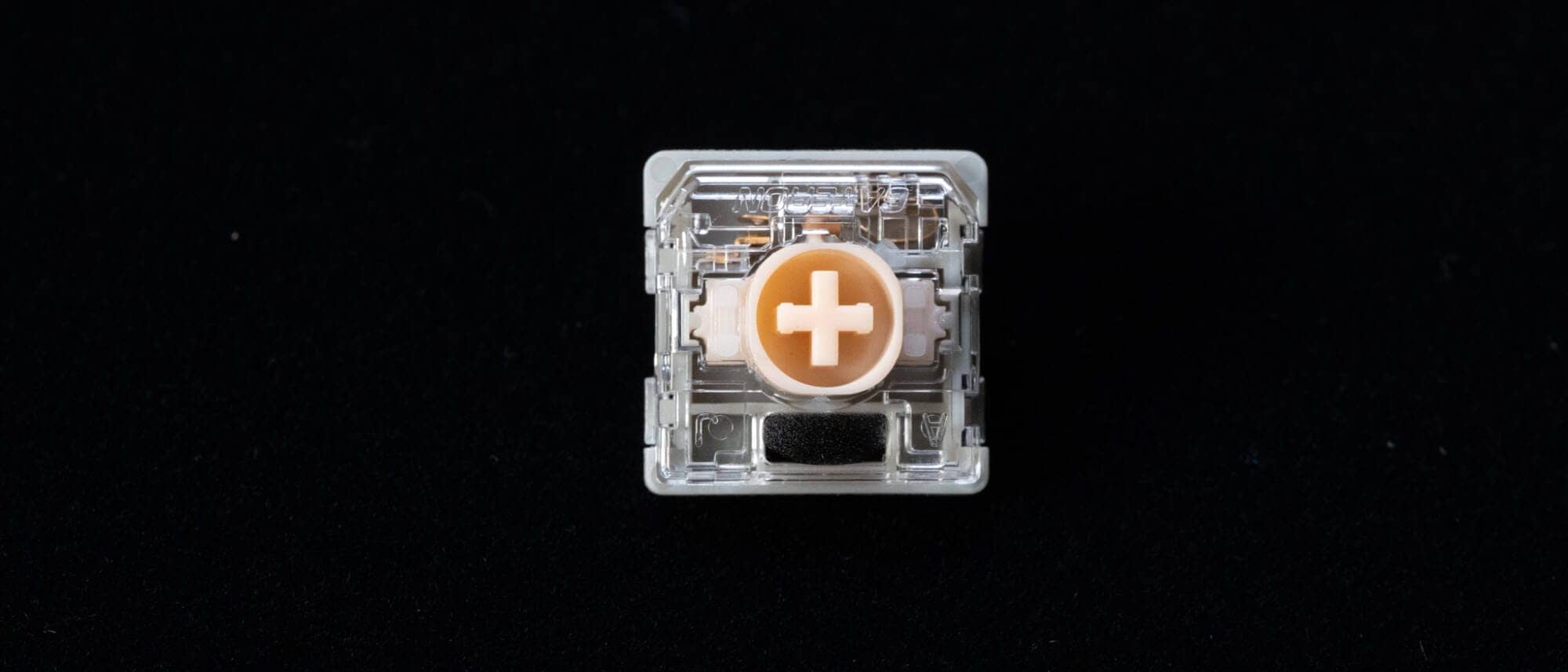
In the end, the concept looks similar to the Gateron LP 3.0 standard, but that hasn’t been explicitly stated.
Now let’s look at the keycaps.
The keycaps use the “LSA profile,” which Keychron has traditionally used on its low-profile keyboards.
They don’t change angle by row, and have a slightly dished, spherical shape.

They’re made of PBT, with dye-sublimated legends.
On the actual keycaps, the legends are color-coded in three colors, and linked to the fn1/fn2 colors for better visibility.


On the other hand, if you already use a split keyboard like the Cornix LP, it’s entirely possible Orca echo’s unique keymap and printed legends won’t suit you.
With that in mind, we were told they’ve already started designing two additional keycap options: “blank” and “no layer legends.”
For the no-layer-legend keycaps, they’re considering intentionally low-contrast designs such as “white on white or gray on white,” and “black on black or ink-black,” to reduce visibility on purpose.
KawamuraIt sounds like there will still be plenty to look forward to after the crowdfunding ends.
Who is Orca echo for?
What you’ll naturally wonder is: “Who is actually buying the Orca echo?”
We asked Mr. Sato, the operations lead at Kopec Japan, about what kind of people are purchasing it.
With the caveat that he “doesn’t have exact data,” Mr. Sato said that “in conversations with actual buyers in Kyoto, a very large number said this was their first split keyboard.”
In other words, it’s fair to say Orca echo buyers clearly aren’t “only DIY keyboard fans.”
KawamuraAs of writing, the number of buyers has exceeded 23,000.
Even considering the DIY keyboard audience, that feels clearly high.
As a keyboard, there’s no doubt Orca echo has high switching costs.
A very small 40% key count, a split layout, unfamiliar trackball cursor control, and a column-staggered layout—calling it “everything new all at once” wouldn’t be an exaggeration.
Even so, with this many people buying it, we think the background is that they’re effectively “buying a new typing experience.”
They may be drawn to the “new value” of being able to complete cursor control without leaving home position.
Concepts like this have existed in the DIY keyboard world for a long time, but the barrier to getting one was high—and even after getting one, soldered assembly added yet another hurdle.
Orca echo seems to be driving these sales precisely because it’s positioned as a “finished product” that clears so many of those needs.
Orca echo is a product with high transition costs from a typical keyboard.
However, there’s significant value in the fact that, as a finished product, it makes an input experience that used to live in the DIY keyboard space accessible for general users to try.
At the same time, adapting to 40%, column-staggered, and layer-based operation isn’t for everyone, so having a chance to try the real unit before buying is extremely important.
Summary
That wraps up our report from the Orca echo early hands-on event.
With crowdfunding as a sales model, one downside is that it’s hard to see “what the product is actually like to use,” and it’s easy to imagine many people hesitating to commit to a purchase.
In that sense, this early hands-on event seems to have been a great opportunity to “give hesitant buyers the push they need.”
Only a few days left until the Orca echo crowdfunding deadline.
We’ll be watching closely to see how far the backer count climbs by the end.
- Originally published:
- Last updated:
- Reporting method: Independent reporting
- References/Citations:
- Conflicts of Interest: Product provided: None Monetized links in this article: None


Google検索の「優先ソース」にGreenkeysを追加します
Add Greenkeys as a Preferred Source on Google
