


On May 1, 2026, Sanyo Godo Kaisha announced in a press release the launch of the NuPhy “Node100 JIS” in the Japanese market.
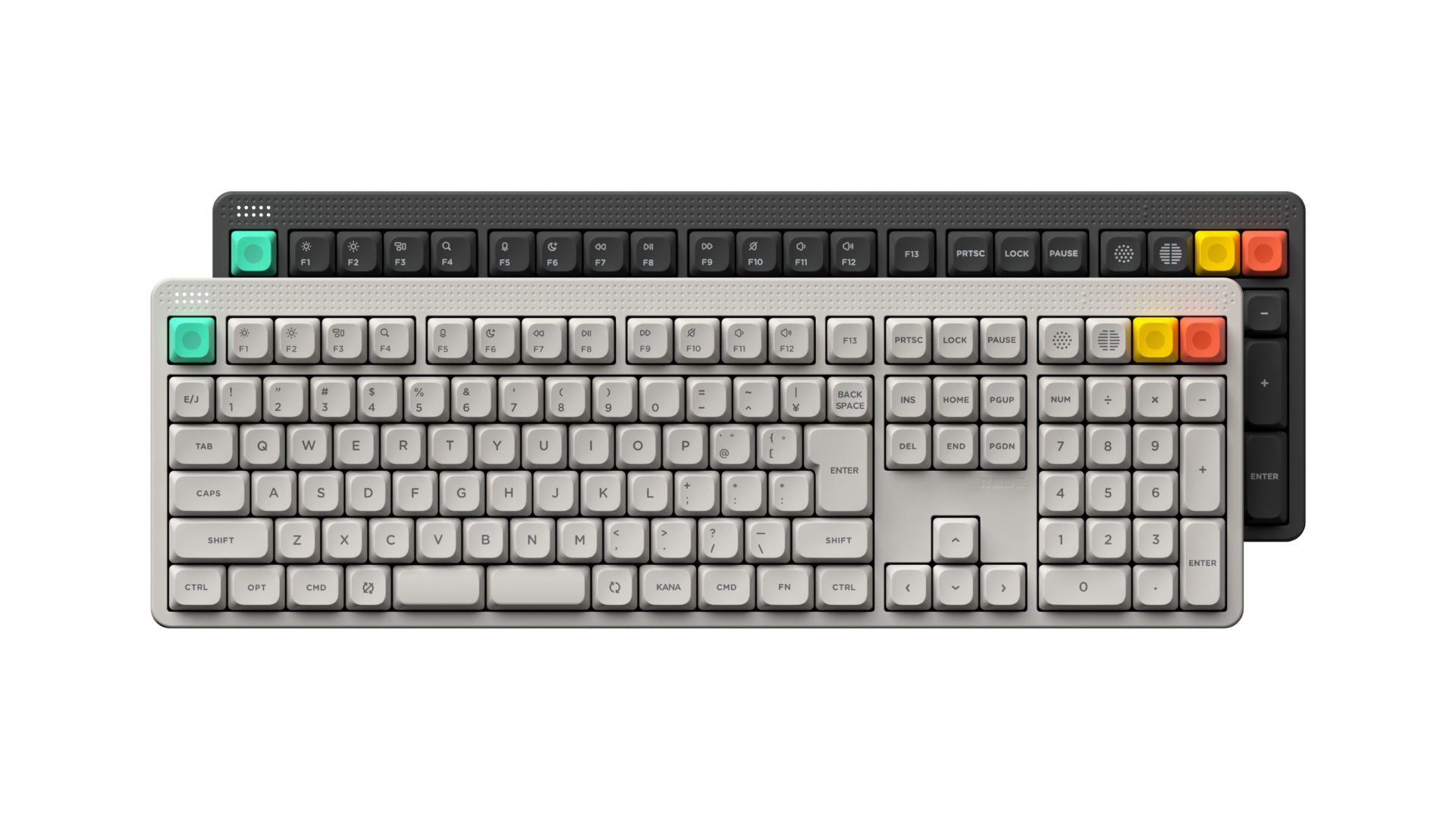
The Node100 JIS is listed at a price of 20,350 yen (tax included).
The Node100 is a 100% layout wireless mechanical keyboard belonging to NuPhy’s new “Node” series.
The model announced this time is a Japanese layout version based on a full-size layout.
Since a 75% layout has already been released in the Node series with a Japanese layout, many people might view the Node100 JIS as an expanded version of that.
However, the layouts for the low-pro and high-pro versions are quite different this time.
In this article, we will break down the differences between the low profile and normal profile versions and help you decide which one to choose.
Node 100 JIS Overview
- Choose from low profile or high profile versions
- Available in 2 colors: Luna White and Ink Gray
- 3 types of key switches: Red (Linear), Brown (Tactile), and Blush (Silent Linear)
- Price: 20,350 yen (tax included)
- Shipping: Scheduled for late May
*Pink is not available.
*Available key switches vary by retailer, but DIGIART is the only place where you can choose from all of them.

Key Highlights of the Node JIS Series
The Node series is classified as an “entry-level” lineup among the keyboards released by NuPhy.
It can be seen as an introductory NuPhy model that keeps the mounting methods of higher-end models while reducing the retail price by using resin for the housing.
Among them, the JIS model stands out as being a bit different.
A major feature of the JIS model is its split spacebar.

Combined with the “NuPhy IO 2.0” web app, which allows you to remap keys, this enables a brand-new typing experience.
In other words, you can assign the left spacebar you usually use to “Space” and the right spacebar to “Backspace” or “Enter.”
Additionally, by using the MOD-TAP function, you can assign behaviors like “SHIFT” or “Layer” when a key is held down, allowing you to customize your own typing efficiency.
 Kawamura
Personally, I assign the right spacebar to Backspace. I realized that reaching for a frequently used key in the top right with my pinky was actually quite exhausting (lol).
It also seems like it would pair well with the Nape Pro.
Look at the layout, not just the height


The Node100 comes in low profile and normal profile models, but their layouts are fundamentally different.
Layout explanation according to NuPhy’s official FAQ
- The low profile version features a reorganized functional area designed for modern office work and system navigation.
- The high profile version is designed to minimize the learning curve by maintaining a standard full-size 100% layout.
This is the most important difference when choosing a Node100.
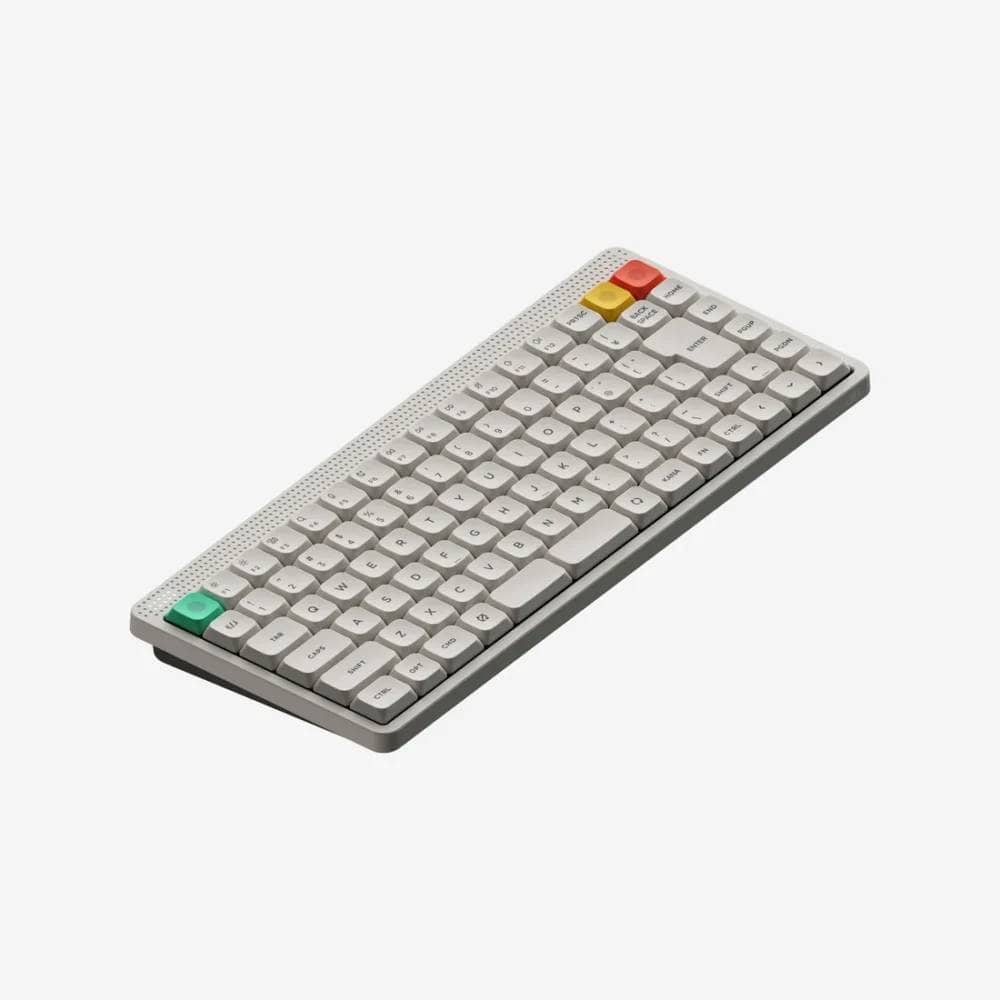
The low profile version is a so-called 98%-style configuration, similar to a 75% layout with a numpad added.
It’s suitable for people who want a numpad but want to keep the width down.
On the other hand, the normal profile version is closer to a more orthodox 100% layout.
The numpad, arrow keys, and special keys are in independent sections, making it easier to choose for those who want to use it in a way that stays true to the basics.
Low profile version: Focus on space-saving with 75% + numpad
Features of the Low Profile version
- Left Shift key is 2.0u (0.25u shorter than usual)
- Z-row stagger is shifted further left than usual
- Special keys and arrow keys are not independent
- 4 cm narrower than the high-pro model
- Thin design allows for typing with a laptop-like feel
- Equipped with a split spacebar
- Available in two colors: Luna White and Ink Gray
- 20,350 yen (tax included)
The low profile version is a model suited for people who want a thin design to keep their desk looking clean.
Let’s take a look at the layout.
It’s divided into left and right sections by the numpad; the left side is a 75% layout where the left Shift key, characteristic of Japanese layouts, is slightly shorter.
It’s a layout that looks as if a numpad was simply attached to that.

However, it’s not exactly the same as just adding a numpad to the Node75 JIS.
If you look closely, the area around the arrow keys is different.
While the Node75 JIS LP has the arrow keys continuous with the modifier keys, the Node100 JIS LP has a layout with space next to the “←” key.
 Kawamura
Personally, I prefer having space next to the arrow keys because it reduces mistakes when operating them by touch.
Also, the width is significantly different compared to the high profile model.
While the high profile model has a width of 441.8 mm, the low profile version is 398.6 mm, which is about 40 mm (4 cm) shorter.
Therefore, it will be a good option even for those with limited desk space.
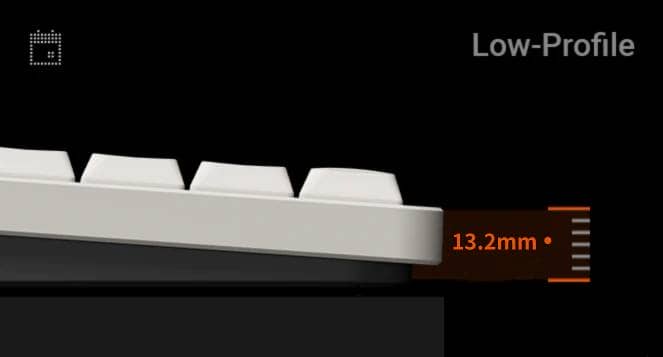
Additionally, since it is a low profile model, a major benefit is that you can type with a feel similar to a standard laptop.
High profile version: An orthodox 100% layout
Features of the High Profile version
- Left Shift key is 2.25u
- Z-row stagger is the same as standard keyboards
- Special keys and arrow keys are independent
- 4 cm wider than the low-pro model
- Due to the height, using a palm rest is recommended for typing
- Features the deep stroke characteristic of mechanical keyboards
- Equipped with a split spacebar
- Available in two colors: Luna White and Ink Gray
- 20,350 yen (tax included)
The high profile version follows the traditional 100% layout used until now.
The Z-row stagger is also orthodox, and since the arrow keys are independent, mistakes during touch typing should be minimized.
However, since the width is about 4 cm longer than the low-pro version, it seems better suited for those with plenty of desk space.
Also, since the height is about 19 mm, Greenkeys recommends using a palm rest (wrist rest) for comfortable typing.
 Kawamura
At this time, you can purchase a dedicated wrist rest from NuPhy’s main site.
(Use coupon code “ryo10” for 10% off.)

| (data) item | low profile version | Normal Profile version |
|---|---|---|
| Domestic price | 18,700 yen | 18,700 yen |
| Layout direction | 100% equivalent with a focus on space-saving | Close to a standard 100% layout |
| Switch type | Low-Profile 3.0 | High-Profile 3.0 |
| keycap | Double-shot nSA | Double-shot mSA |
| mount(ing) system | Gasket mount | Gasket mount |
| hot swap | support | support |
| N-key rollover | support | support |
| access method | 2.4GHz / Wired USB-C / Bluetooth 5.0 | 2.4GHz / Wired USB-C / Bluetooth 5.0 |
| Pauling rate | 2.4GHz/Wired: 1000Hz / Bluetooth: 125Hz | 2.4GHz/Wired: 1000Hz / Bluetooth: 125Hz |
| Size | 398.6 × 141.1 × 13.2 mm | 441.8 × 141.7 × 18.9 mm |
| weight | 787.3 g | 1084.3 g |
| Typing angle | 4° / 8° / 11 | 6° / 9° / 12 |
| battery | 3000mAh | 4000mAh |
| Battery life with lights on | 60 to 100 hours | 60 to 100 hours |
| Battery life with lights off | Up to 1000 hours | Up to 1000 hours |
| Target audience | People who prioritize thinness and space-saving | People who prioritize a traditional feel |
Which one should you choose?

As you can see, even with a similar look, the layouts for the low profile and high profile versions are quite different.
Based on this, many of you may be wondering which one to choose.
Our editorial team believes that if the overall coloring and texture are the same, the low profile version will be the first choice for most people.
Of course, the low-pro version has a somewhat unique or tricky layout, and there will be many cases where the high-pro version, which uses an orthodox layout, feels easier to use.
KawamuraAs an enthusiast, I’d recommend the high-profile version for its superior typing feel.
Also, if you find the shallow stroke of Kailh Choc v2 switches—already used in keyboards like Lofree—unsatisfying, the low-profile version should meet your needs. With the Gateron LP 3.0 switches recently adopted by NuPhy, you can expect a deeper stroke despite the low-profile design.
However, considering the target audience, the low-pro version wins from the perspective of “switching from an office external keyboard.”
The biggest reason for this is that the angle of your wrists during typing doesn’t change.
The high-pro version is a “mechanical keyboard” for better or worse, so while you can enjoy a deep stroke, it is taller than the keyboards used in offices and may take time to get used to.
If you already use a mechanical keyboard regularly, I would recommend the high-pro version, but if you’re choosing it with the intention of getting “a slightly better keyboard,” I think you’ll have fewer regrets with the low-pro version.
 Greenkeys Office
When using it in an office, choose the “Blush Switch (Silent Linear).”
It makes almost no sound when typing.
If you’re in an office where noise isn’t an issue, any other switch is fine.
Node100: A great fit for office environments
The Node100 is presented as a 100% layout with a numpad, function keys, and a touch zone, making it perfect for office use.
On the DIGIART product page, the Node100 is described as “a truly practical presence that brings out your best performance at work.”
It’s a product that’s easy to consider not just for individual use, but also for bulk adoption by corporations and offices, or as a candidate for office keyboard selection.
For consultations on selecting or implementing office keyboards, GreenEchoes Studio, the operator of Greenkeys, is also available for inquiries.
Summary | When in doubt, go for the low-pro version
We’ve explained how to choose the Node 100 JIS.
Let’s summarize the features again.
Features of the High Profile version
- Left Shift key is 2.25u
- Z-row stagger is the same as standard keyboards
- Special keys and arrow keys are independent
- 4 cm wider than the low-pro model
- Due to the height, using a palm rest is recommended for typing
- Features the deep stroke characteristic of mechanical keyboards
- Equipped with a split spacebar
- Available in two colors: Luna White and Ink Gray
- 20,350 yen (tax included)
Features of the Low Profile version
- Left Shift key is 2.0u (0.25u shorter than usual)
- Z-row stagger is shifted further left than usual
- Special keys and arrow keys are not independent
- 4 cm narrower than the high-pro model
- Thin design allows for typing with a laptop-like feel
- Equipped with a split spacebar
- Available in two colors: Luna White and Ink Gray
- 20,350 yen (tax included)
If you’re “looking for a slightly better keyboard,” you’ll likely have fewer regrets with the low-pro version. If you use mechanical keyboards regularly and don’t mind using a wrist rest, you’ll probably be more satisfied with the high-pro version.
Why not try the Node 100 JIS for your office use?
- First published: May 2, 2026
- Last updated: May 2, 2026
- Method of coverage: Official release from the manufacturer
- References/Citations:
- Conflicts of Interest: Product Offering: None Monetization Link in this paper: Yes


Google検索の「優先ソース」にGreenkeysを追加します
Add Greenkeys as a Preferred Source on Google

