
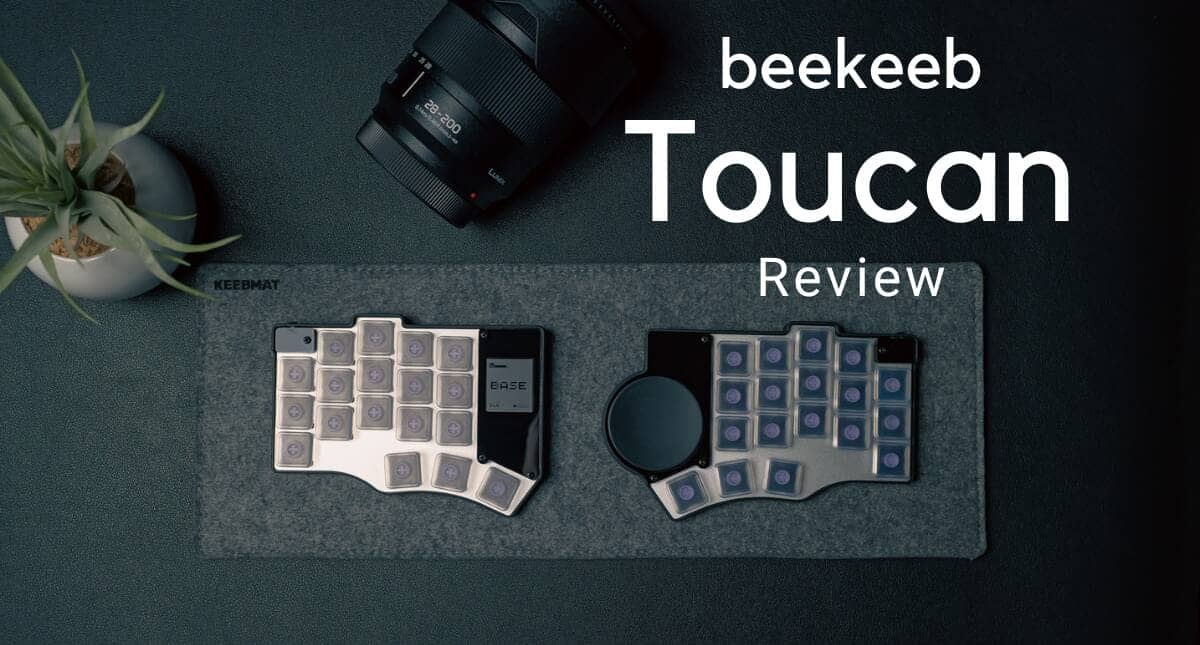


The highly distinctive Toucan keyboard might just resonate with your sensibilities.
Toucan is a keyboard with a rather sharp configuration: split left-right design, column-staggered layout, 17mm pitch, low-profile switches, and an integrated trackpad.
While it’s not a product that extends from conventional integrated keyboards, it will appear quite attractive to those who want to carry a thin and compact split keyboard, or those who want to minimize hand movement during typing.
When actually tested, it’s surprisingly thin and compact for a split keyboard, with a size that’s realistically usable on the go.
Since everything, including cursor operations, can be completed at your fingertips, once you get used to it, you may experience an extremely comfortable typing experience.
The combination of 17mm pitch and low-profile configuration is also nimble, easy to use without a palm rest, and comfort can be further enhanced when combined with the separately sold lightweight tenting stand.
Toucan is more of a product aimed at those interested in split keyboards and custom keyboards rather than a mass-market finished keyboard.
When purchasing, you’ll want to check not only the main unit price but also assembly difficulty and keycap compatibility. However, we evaluate it as worthwhile for the typing experience that can be completed with minimal finger movement.
This article reviews the Toucan 42keys/36keys.

- 特定ニーズにダイレクトに刺さる設計思想が魅力的
- 外出先でのタイピング体験を1段階引き上げるポテンシャル
- 3DPケースながら完成度の高い仕上がり
- 好みに応じて選べる40%と30%レイアウト
- DIYキーボードとしての魅力
- 組み立て難易度は決して低くはない
- 交換用キーキャップの選択肢が限定的
- トラックパッドは割り切った運用が必要
- 小指側のレイアウトには注意が必要
- 3Dプリントらしい質感は残る
- 有線接続時の取り回しには注意
- 通常配列からの移行コストはかなり高い
- カスタマイズにはある程度の知識が必要

Price, sales format, and availability
- Availability: ★★☆☆☆ (Limited quantity, pre-order sales with limited stock)
- Price Range: Tends to be higher than competing products for finished units
- Sales Format: Kit sales / Finished product sales
- Where to Buy: beekeeb.jp/beekeeb.com
Editorial Comment
Toucan is more of a product aimed at those interested in split keyboards and custom keyboards rather than a mass-market finished keyboard. When purchasing, it’s better to consider not only the main unit price but also the assembly work required, and the compatibility of keycaps and peripheral accessories.
Toucan Specifications Overview

Let’s start by looking at the overview of Toucan.
Toucan is a split keyboard featuring a left-right split configuration, 17mm pitch, low-profile switches, and a circular trackpad mounted on the right side.
Unlike conventional integrated keyboards, the configuration emphasizes compactness and a unique typing experience.
Toucan is not just a split keyboard; it has quite distinctive features in its focus on portability, reduced finger movement with 17mm pitch, and integrated pointing operation with trackpad.
On the other hand, these features also translate directly into adoption barriers.
There are indeed points to understand in advance, such as the migration cost from standard layouts, special keycap considerations, and divided preferences regarding the trackpad.
Price and Variations
| Configuration | 36keys | 42keys |
|---|---|---|
| DIY Kit | ¥29,800 | ¥29,800 |
| Pre-soldered Finished Product | ¥47,000 | ¥47,000 |
| Pre-soldered Finished Product (with Battery) | ¥49,800 | ¥49,800 |
| (data) item | Toucan 36keys | Toucan 42keys |
|---|---|---|
| Product name | Toucan 36 Wireless Split Keyboard with Touchpad | beekeeb Toucan Keyboard |
| Number of keys | 36 keys | 42 keys |
| Layout Type | Piantor / Cantor-based | Piantor-based |
| structure | Split keyboard | Split keyboard |
| Pointing Device | Built-in trackpad | Built-in trackpad |
| Trackpad Specifications | Cirque 40mm GlidePoint Circle Trackpad | Cirque 40mm GlidePoint Circle Trackpad |
| access method | Bluetooth Wireless | Bluetooth Wireless |
| Controller | Seeed Studio XIAO nRF52840 Plus ×2 | Seeed Studio XIAO nRF52840 Plus ×2 |
| firmware | ZMK | ZMK |
| Display | Low-power memory LCD display ×1 | Low-power memory LCD display ×1 |
| switch(ing) on | Kailh Choc v1 / Choc v2 | Choc v1 / Choc v2 |
| Key Pitch | Same narrow pitch as Piantor | Same narrow pitch as Piantor |
| Notes When Using Choc v2 | Choc-spacing MX stem keycaps required | Narrow pitch compatible MX stem keycaps required |
| hot swap | Yes | Yes |
| Case Top | Silver anodized aluminum top plate | Silver anodized aluminum top plate |
| Case Bottom | 3D printed bottom case (PLA) | 3D printed bottom case (PLA) |
| Other Case Components | Acrylic decoration, protectors, screws, rubber feet | Acrylic, plates, screws, non-slip rubber feet |
| Case Characteristics | Lightweight, compact enclosed case | Lightweight, compact enclosed case |
| Sales Format | DIY Kit / Pre-soldered Finished Product / Pre-soldered Finished Product (with Battery) | DIY Kit / Pre-soldered Finished Product / Pre-soldered Finished Product (with Battery) |
| battery | Finished product with battery only Includes 3.7V Li-ion polymer battery ×2 | Finished product with battery only Includes 3.7V Li-ion polymer battery ×2 |
| Not Included in Contents | Switches and keycaps | Switches and keycaps |
| Intended use | Portable use for work / travel / flight | Designed for use on the go, during travel, and in-flight |
Toucan Review Environment
The review environment is as follows
- Connection Environment: macOS
- Switches Used: Kailh choc v2 Kailh Deep Sea Island Mini Pink/Kailh choc v1 Ambients Silent Choc v1 Bokeh
- Layout: 30% and 40%
- Primary use: content writing (typing Japanese)
Evaluation of keystroke feel and keystroke sound
Due to the review being conducted with silent switches, there are no particular points worth noting in this article.
Given Toucan’s nature, with an aluminum switch plate and top-mount configuration, it’s a keyboard where switch characteristics appear directly.
What Kind of Keyboard is Toucan

If we were to describe Toucan in one phrase, it’s a rather sharp split low-profile keyboard with a strong emphasis on portability.
Split keyboards tend to be designed for stationary use and often become large.
In that regard, Toucan is thin and compact, and will truly shine when used on the go.
This size and thinness is a major attraction, and there aren’t many split keyboards yet that can be considered for mobile use.
Thanks to the 17mm pitch, it’s quite compact even compared to regular split keyboards, which is very attractive.
Combined with the low-profile configuration, once you get used to it, you can achieve a quite nimble typing experience.
Toucan’s Advantages
Let’s start by looking at Toucan’s advantages.
Toucan’s Advantages
- Design philosophy that directly appeals to specific needs
- Potential to elevate the typing experience on the go by one level
- High-quality finish despite being a 3DP case
- Choice of layouts according to preference
- Appeal as a DIY keyboard
Design Philosophy That Directly Appeals to Specific Needs
It’s no exaggeration to say that Toucan’s greatest appeal is its “sharp design philosophy that satisfies all specific needs.”
Greenkeys views Japan as a market with very special needs, quite unusual in the global keyboard market, where “split keyboards” are highly popular.
What we consider as the background for this is the “pursuit of efficiency.”
The result was the “40% layout that eliminates the number row,” wasn’t it?
The “typing experience” of being able to concentrate on typing while maintaining the home position is irreplaceable.
Greenkeys views “Toucan” as the result of taking this philosophy even further.
Toucan’s Sharp Features
- 17mm pitch | Improved portability through miniaturization. Benefit of reduced finger travel distance.
- Low-profile | Achieves typing with the same feel as a laptop. Eliminates need for palm rest, reducing luggage when going out.
- Trackpad | Even cursor operations can be achieved without moving arm position
- Fully wireless connection | Freedom from cables, usable with any device
- ZMK Studio support | Easy keymap changes via GUI
- Standard tenting stand support | Typing at preferred angle
- Finished product option available | Usable even for beginners without soldering experience
- Large display | Equipped with highly visible display
- Expandability | Expandability using Prospector
Products that satisfy all these needs are certainly not many.
This uniqueness can be said to be Toucan’s greatest appeal.
Potential to Elevate the Typing Experience on the Go by One Level

Using Toucan changes the typing experience on the go.
Simply open your laptop and turn on Toucan’s switch to use it, allowing you to concentrate on work immediately.
With its fully wireless design, there’s no need to worry about cable management.
Using silent switches allows typing without worrying about surroundings, and using it with the separately sold tenting stand will enable even more comfortable typing.
The trackpad allows cursor operations to be completed without removing hands from the keyboard, and the extremely compact body doesn’t get in the way when carrying and can be slipped into a bag.
In the sense that you can have the “ultimate typing experience” anywhere, Toucan has a unique appeal.
High-Quality Finish Despite Being a 3DP Case

Toucan also shines in its case design.
While the case is 3D printed and layer lines can be seen on the sides, there’s little difference from injection molding otherwise.
Not only is the case designed to be extremely thin, but consideration has been given to usability, such as stickers that allow visual confirmation of power on/off.
The aluminum switch plate elevates the quality by another level.
Choice of 40% and 30% Layouts According to Preference
Toucan allows you to choose from two layouts: 42keys and 36keys according to preference.
Those who want to use Enter, Backspace, Shift, Esc, Tab, etc. with the same feel as standard 60% or larger layouts will find the 40% suitable.
On the other hand, the 30% keyboard allows you to experience “more efficient typing with less finger movement.”
There’s also the fun of customizing your keymap, such as assigning modifier key operations from the pinky to the thumb, or assigning them to other keys with Mod-Tap.
Appeal as a DIY Keyboard
Toucan’s base is a “DIY keyboard.”
This embodies the “joy of assembly” using a microcontroller system, and the enjoyment of soldering can be said to be a major appeal.
After all, things you make yourself tend to develop attachment.
Also, the ability to enjoy customization using unused pins is part of Toucan’s appeal.
Toucan’s Disadvantages
Toucan is a very sharp product.
While its sharpness brings great appeal, there are of course points to note that should be accepted before purchase.
Here, we summarize what the author felt should be noted before purchasing Toucan.
Toucan’s Disadvantages
- Assembly difficulty is not low
- Limited replacement keycap options
- Trackpad requires compromised operation
- Pinky-side layout requires attention
- 3D printed texture remains
- Caution needed for wired connection handling
- Migration cost from standard layout is quite high
- Customization requires some knowledge
Assembly Difficulty is Not Low
Toucan is basically a DIY keyboard kit that requires soldering.
Therefore, if you purchase a product other than the “finished version,” assembly using solder is required.
While a very detailed build guide is provided so you won’t get lost in assembly steps, the soldering difficulty around the microcontroller seemed somewhat high.

As shown, you need to solder by flowing into the sides of the 1.57mm pitch metal contacts.
Since you need to separate from adjacent contacts, it can be said that a certain level of soldering skill is necessary.
If soldering yourself is difficult, third-party soldering services also exist.
Greenkeys introduces “dawne keyboard services” which has extensive work experience.
There is no conflict of interest with GreenEchoes Studio.
Limited Replacement Keycap Options

Toucan does not use standard key pitch, so general keycaps cannot be used.
Generally, key pitch is 19.05mm spacing on the PCB, but Toucan adopts a narrower 17mm pitch.
Therefore, if you try to install standard-size keycaps of about 18mm square, adjacent keys will contact each other, so you must prepare keycaps specifically for 17mm pitch.
Also, the fact that keycap options differ depending on key switch specifications is a complex point of this issue.
Toucan supports Kailh low-profile key switches “choc v1” and “choc v2.”
- Kailh choc v1 switches | The keycap mounting hole has two parallel slits
- Kailh choc v2 switches | The keycap mounting hole is cross-shaped

For choc v1 switches, there’s a concept called choc v1 spacing, and many keycaps compatible with so-called “narrow pitch” exist.
 Kawamura
In fact, beekeeb shop carries many of them.
Most are FKCaps products.
However, some may be “too small when used with Toucan, leaving gaps between adjacent keycaps,” so caution is needed.
KawamuraAs far as the editorial team confirmed, keycaps released by chosfox appeared to be one size smaller.
Regarding “commercial products” of Kailh choc v2 narrow pitch keycaps, currently only a few types exist.
- Tai-Hao MT165 (flat profile)
- Tai-Hao THCS-MX (flat profile)
- Notra (spherical profile)
- shell-caps (top hat profile)
Note in advance that flat profile keycaps may make it difficult to determine finger position during typing if you’re not used to them.
Trackpad Requires Compromised Operation
Regarding trackpad use, it’s better to consider that the operations you imagine may not be achievable.
We judged that the trackpad adopted in Toucan should basically be considered as “one-finger operation.”
The reason is that tap click detection is somewhat less sensitive compared to laptops or trackpads.
Therefore, as a usage method, we recommend that the trackpad takes on the role of “cursor operation,” and left/right click operations should be set separately as “key presses” with key switches.
Pinky-Side Layout Requires Attention

Toucan is designed based on the Piantor layout.
Compared to the “Corne” layout, famous for split column-staggered layouts, you can see that the pinky side drops significantly toward the front.
While it’s only a few millimeters in distance, those who have used Corne may feel discomfort with the pinky position.
Placing Toucan at an angle may allow use with the same feel as Corne. (The author places it at an angle.)
3D Printed Texture Remains

Toucan’s case is 3D printed.
While there’s almost no visible difference from general products, upon close inspection “layer lines” can be seen.
This is unavoidable for 3D printed products, so you need to accept this before purchasing.
KawamuraWhile machined aluminum cases or injection-molded resin cases are in high demand, we presume the choice of 3D printing is due to the nature of being a niche genre product.
Caution Needed for Wired Connection Handling

Since Toucan is designed to be extremely thin, there’s a possibility of interference between the desk and keyboard body during wired connection.
This is explained in the FAQ, so it needs to be understood before purchase.
Since Toucan is basically used with wireless connection, the editorial team considers this not a major issue.
Migration Cost from Standard Layout is Quite High

Toucan is not the type that allows seamless migration from standard layout keyboards.
With split left-right, column stagger, 17mm pitch, and thumb keys, there are many elements requiring adaptation, and the switching cost is quite high.
Until you get used to it, even normal typing may be difficult, so purchase is suitable for those who can accept it as a “gadget requiring practice.”
Customization Requires Some Knowledge
While Toucan has very high “customization” freedom, it’s also a device with much to learn to configure yourself.
Particularly regarding firmware flashing and keymap configuration using ZMK Studio, you need to read the guide carefully.
Also, note in advance that some trackpad setting items require building the firmware yourself.
KawamuraWe’d also like to see consideration of releasing 3D data for those who want to customize further.
[Photo Review] beekeeb Toucan (36keys/42keys) Review
Now let’s look at actual photos of Toucan.
What was provided this time is the battery-included finished version of 42keys/36keys.

Packaging is simple, with a sleeve over an anti-static bag.


The main unit is stored in hollowed-out urethane.

The top in the photo is the 36keys model, the bottom is the 42keys model.
Looking at each half, the major feature is that 36keys has 5 columns and 42keys has 6 columns.
The left side has an LCD screen, the right side has a 40mm diameter trackpad installed.
The switch plate is aluminum, and various parts are acrylic.
Looking at the back, you can see a magnetic ring installed in the center.
The case itself is 3D printed, with thin rubber non-slip pads attached at four points on the bottom.
The technical compliance sticker placement differs by model.


This magnetic ring can attach the separately sold tenting stand.

It has the same structure as smartphone magnetic attachment rings, making attachment and removal easy.
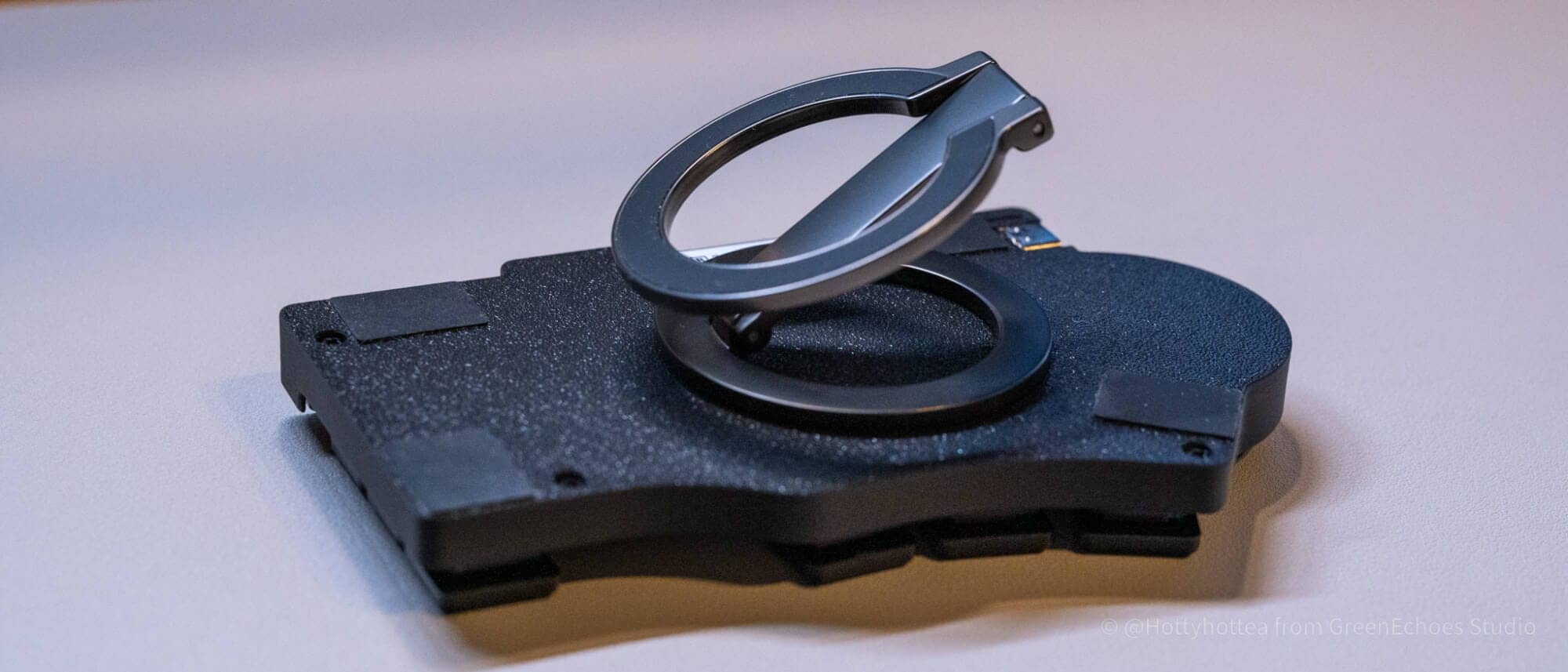
Tenting split keyboards may enable more comfortable typing.
It’s definitely a product you’ll want to prepare as a set.
However, when tilted, the left and right edge grips may be insufficient, potentially causing slipping during typing.
If you feel this way, we recommend attaching Grip Plus.


Toucan’s key spacing is narrower than usual, making it more compact, which is one of its features.
Let’s compare with other keyboards.
From top: Palmslave (16mm pitch), Toucan (17mm pitch), Corne v4 chocolate mini (19.05mm pitch).
While the outer size is quite similar, you can see that the spacing between keys differs slightly.


Next, let’s look at Toucan’s details.
First, a major feature is this thinness.
It’s extremely thin.

Prioritizing thinness, the microcontroller’s USB port is at the same height as the bottom surface.
When using wired, note that there’s a risk of cable and desk surface interference without tenting.
The case material is 3D printed, and upon close inspection, layer lines are visible.

Having a green mark on the on side to show power on/off shows consideration for accessibility.
Note that the switch on direction is “slide right” for both left and right.
Let’s look at the key switch area.
The key switch center stem is about 5mm in diameter, allowing use of not only choc v1 but also v2.


For keycap choice, you need to install ones for 17mm pitch.
For choc v1, FKcaps products fit perfectly without noticeable gaps between keys.


However, note that keycaps other than FKcaps may leave gaps between adjacent keys.
Also, there aren’t many variations of choc v2 17mm pitch compatible keycaps at present.
Tai-Hao keycaps sold at beekeeb shop are the first choice, but since they have no homing and the keytop is completely flat, those who usually use cylindrical style keycaps like Cherry profile may find them quite uncomfortable.

 Kawamura
We expect variations in this area to increase in the future.
I personally use Kotiri Blank.


The switch plate is aluminum.
The typing feel is somewhat firm, but since the body weight isn’t that heavy, it’s hardly noticeable.

According to the product description, the trackpad uses “40mm Cirque GlidePoint Circle trackpad.”
| (data) item | Contents |
|---|---|
| Product Line | Cirque GlidePoint Circle Trackpad |
| Representative Model Number | TM040040 |
| Diameter | 40.0mm |
| Sensing Area | 38.0mm diameter |
| Detection Method | Mutual capacitance sensing |
| interface | SPI or I2C |
| power (button on TV, etc.) | 2.5–3.6V |
| Coordinate Range | X: 0–2048 / Y: 0–1536 |
| Recommended Active Range | X: 128–1920 / Y: 64–1472 |
| Position Reporting | Absolute / Relative both supported |
| Touch Pressure | Not required |
| Operating Temperature | -40–85℃ |
The documentation states “Simply move a finger across the trackpad to move the cursor,” and touch data is expressed as “absolute finger position.”
In other words, at least as the standard specification of this TM040040/Pinnacle generation, it’s better to consider it as a one-finger pointing device rather than a full-fledged multi-touch trackpad like smartphones or MacBooks.
KawamuraWhile tap, drag, and gesture-like commands seem implementable with firmware builds, precision-wise it’s difficult to compare with Magic Trackpad, etc.
From our impression of use, while mouse button operations with taps are possible, it’s less stressful to accept the trackpad as purely for moving the cursor.
I assign click operations to separate keys.
Indeed, unlike Keyball-type thumb operation devices, devices with index finger pointing make it difficult to maintain right-hand home position.
However, since the movement distance isn’t that large, returning to home position isn’t too difficult.
However, I felt it would be smoother to have homing at the “J” position as a landmark.


Who is Toucan Suited For

Toucan is not a finished keyboard for everyone.
- People already interested in split keyboards
- People seeking low-profile and compact configuration
- People wanting to reduce finger movement
- People looking for a split keyboard portable for use on the go
- People who can enjoy adjustments and ingenuity as a DIY keyboard
- People wanting to try a split experience in a different direction from Corne or Keyball
For such people, it’s quite an interesting product.
Conversely, for those wanting immediate migration from standard layouts or seeking straightforward usability as a finished product, the barrier may be somewhat high.
However, as mentioned at the beginning, for those who feel its unique appeal, it can be said to be a choice worth selecting.
summary

The Toucan is a unique product that stands out as a thin and compact split low-profile keyboard.
With its compact 17mm pitch design and excellent compatibility with lightweight tenting stands, it offers features that are incredibly appealing to the right audience.
On the other hand, there are clear hurdles to adoption, such as the learning curve when switching from a standard layout, the difficulty of assembly, the trade-offs of the trackpad, and the challenge of choosing keycaps.
Rather than a keyboard that is easy to recommend to everyone as a finished product, it is best viewed as a highly specialized device for those who value an all-in-one, mobile solution that includes split design, low profile, and pointing capabilities.
It’s a fascinating device that will definitely hit the spot for some—why not give it a try?
- Originally published: May 1, 2026
- Last updated: May 1, 2026
- Methodology: Product provided for review and reference to the official website
- Source/Reference: https://shop.beekeeb.jp/products/beekeeb-toucan-keyboard
- Conflicts of interest: Product offering: Yes Monetization link in this paper: No


Google検索の「優先ソース」にGreenkeysを追加します
Add Greenkeys as a Preferred Source on Google

